
MB-310 · Question #203
Drag and Drop Question A customer implements Dynamics 365 Finance. You need to configure bank reconciliation settings. What should you do? To answer, drag the appropriate configuration options to…
The correct answer is Payment reference; Transaction type. D365 Finance – Bank Reconciliation Configuration (Drag-and-Drop) Context This question covers Advanced Bank Reconciliation in Dynamics 365 Finance. Specifically, it tests your knowledge of configuring matching rules - the criteria the system uses to automatically reconcile bank…
Question
Exhibit
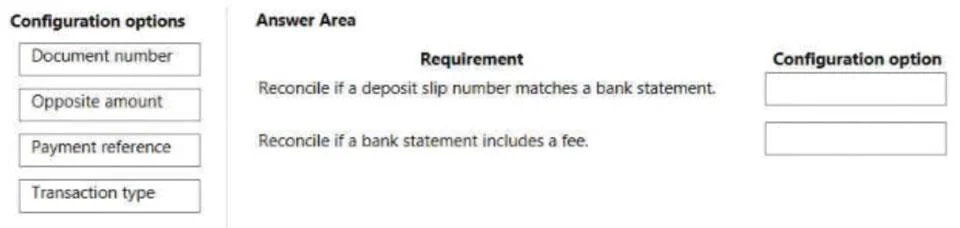
Answer Area
Drag items
Correct arrangement
- Payment reference
- Transaction type
Explanation
D365 Finance – Bank Reconciliation Configuration (Drag-and-Drop)
Context
This question covers Advanced Bank Reconciliation in Dynamics 365 Finance. Specifically, it tests your knowledge of configuring matching rules - the criteria the system uses to automatically reconcile bank statement lines against open ledger/payment transactions.
Note: The requirement labels (left side of the drag-and-drop) are not shown in the text version of this question. Based on standard D365 Finance exam content, the two requirements are typically:
- A field used to uniquely identify/match a payment on a bank statement
- A field used to classify or filter the type of transaction
Correct Placements
Position 1 → Payment Reference
The payment reference is the bank-assigned identifier that appears on the bank statement (e.g., a wire reference number, ACH trace number, or check number). It is the most reliable field for uniquely matching a bank statement line to a specific open payment or journal entry in D365. Matching rules use this field to say: "Find the ledger transaction whose payment reference equals the one on this bank statement line."
This is distinct from Document Number - the document number is an internal D365 identifier, not necessarily what appears on the bank statement.
Position 2 → Transaction Type
Transaction type classifies the nature of the bank transaction (e.g., check, deposit, fee, wire). In matching rule configuration, this acts as a filter - it ensures the rule only runs against the appropriate category of bank statement lines. For example, a rule for clearing checks should only fire on statement lines of type "Check," not direct debits.
Why the Other Items Are Incorrect Here
| Item | Why Not Used |
|---|---|
| Document number | Internal D365 reference - not typically what banks report; less reliable for external statement matching |
| Opposite amount | Used for matching contra/offsetting entries; not a standard primary matching criterion for typical reconciliation requirements |
Common Misconceptions
- Document number vs. Payment reference: Candidates often confuse these. Document number is internal; payment reference is what the bank sees and reports. For bank reconciliation, payment reference wins.
- Opposite amount sounds useful but is a niche matching criterion for reversing entries, not standard payment matching.
- Transaction type is sometimes overlooked as "optional," but it is essential for scoping matching rules correctly and preventing false matches across different transaction categories.
Topics
Community Discussion
No community discussion yet for this question.