
HPE0-S59 · Question #72
Drag and Drop Question Match each HPE OneView network type with its definition. Answer:
The correct answer is Internal network; Tagged network; Untagged network; Tunnel network. HPE OneView Network Types - Match Explanation The question maps four network types to their functional definitions. Here's why each item belongs in its position: --- 1. Internal Network Definition: Traffic is switched only between servers within the same enclosure and never…
Question
Exhibit
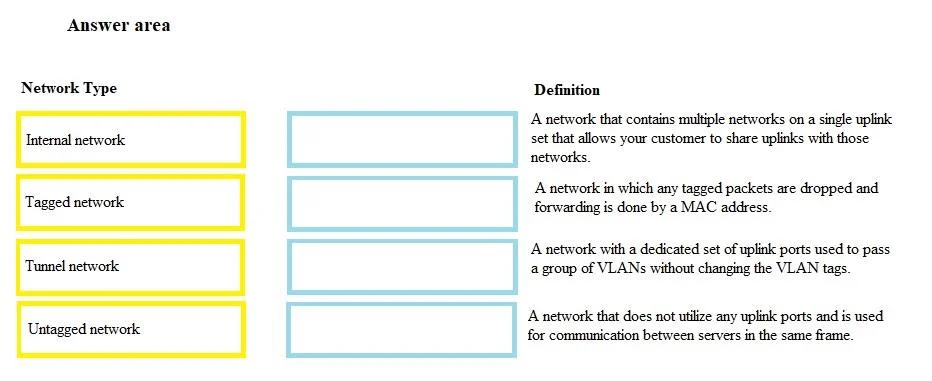
Answer Area
Drag items
Correct arrangement
- Internal network
- Tagged network
- Untagged network
- Tunnel network
Explanation
HPE OneView Network Types - Match Explanation
The question maps four network types to their functional definitions. Here's why each item belongs in its position:
1. Internal Network
Definition: Traffic is switched only between servers within the same enclosure and never exits to an external switch or uplink.
- No uplink set is assigned
- Purely east-west traffic within the logical interconnect
- Common mistake: Confusing "internal" with "untagged" - internal refers to scope (stays inside the enclosure), not VLAN tag behavior
2. Tagged Network
Definition: VLAN tags (802.1Q) are preserved and passed to the server; the server/hypervisor must be VLAN-aware to process them.
- Virtual Connect passes frames with the VLAN ID intact
- Requires the OS or vSwitch to handle tag stripping
- Common mistake: Thinking "tagged" means OneView adds a tag - it means the tag is kept, not that OneView creates one
3. Untagged Network
Definition: Traffic is delivered to the server without a VLAN tag (native/access mode).
- Virtual Connect strips the VLAN tag before delivery
- The server sees plain Ethernet frames with no VLAN awareness needed
- Common mistake: Confusing this with Tunnel - untagged removes the tag; tunnel preserves all tags untouched
4. Tunnel Network
Definition: Frames pass through the Virtual Connect module completely unmodified - all VLAN tags, including non-standard or stacked tags, are preserved.
- OneView performs no tag manipulation
- Used for passing arbitrary VLAN ranges or Q-in-Q traffic to the server
- Common mistake: Confusing tunnel with tagged - tagged networks still involve OneView managing a specific VLAN ID; tunnel bypasses that management entirely
Key Differentiator Summary
| Type | Tag behavior | Traffic scope |
|---|---|---|
| Internal | Managed by OV | Stays in enclosure |
| Tagged | VLAN ID passed to server | External uplinks allowed |
| Untagged | Tag stripped at delivery | External uplinks allowed |
| Tunnel | Completely untouched | External uplinks allowed |
The ordering goes from most isolated (Internal) → most transparent (Tunnel), which reflects increasing levels of VLAN pass-through to the server.
Topics
Community Discussion
No community discussion yet for this question.