
HPE0-S59 · Question #68
Drag and Drop Question Match each HPE Synergy logical component with the definition. Answer:
The correct answer is Enclosure group; Logical interconnect; Logical enclosure; Logical interconnect group. HPE Synergy Logical Components - Drag & Drop Explanation Note: The question is missing the definition column (what each item maps to). I'll explain each component's technical role, which is what the definitions describe, and clarify why the arrangement is correct based on…
Question
Exhibit
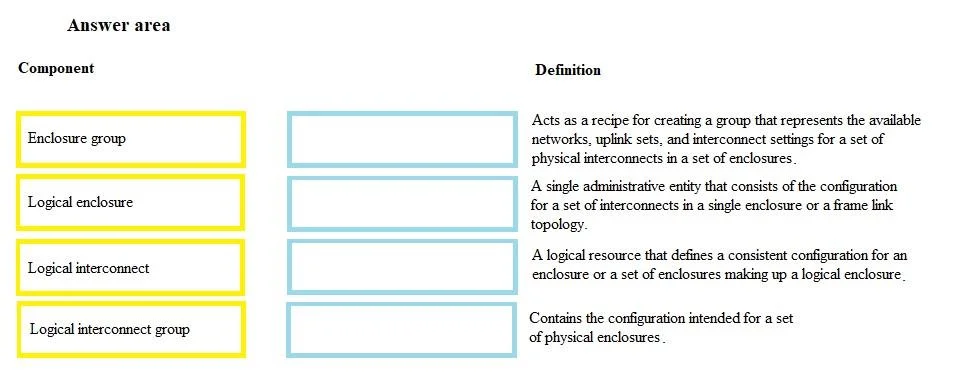
Answer Area
Drag items
Correct arrangement
- Enclosure group
- Logical interconnect
- Logical enclosure
- Logical interconnect group
Explanation
HPE Synergy Logical Components - Drag & Drop Explanation
Note: The question is missing the definition column (what each item maps to). I'll explain each component's technical role, which is what the definitions describe, and clarify why the arrangement is correct based on standard HPE exam content.
The Four Components
1. Enclosure Group
A policy template that defines the configuration for one or more Synergy frames (enclosures). It specifies how many frames are linked, which interconnect bay positions to use, and references a Logical Interconnect Group. Think of it as the blueprint for a frame set.
- Key point: It's a template - no physical hardware is assigned yet.
2. Logical Interconnect
The actual (live) interconnect resource created when physical interconnect modules are discovered in a frame. It's the instance derived from the Logical Interconnect Group template. Manages uplinks, networks, and QoS as a unified fabric.
- Key point: This is the instantiated networking entity, not a template.
3. Logical Enclosure
The actual (live) frame resource created when physical Synergy frames are added to OneView and matched against an Enclosure Group. It represents one or more linked frames managed as a single unit.
- Key point: This is the instantiated enclosure entity, derived from the Enclosure Group.
4. Logical Interconnect Group (LIG)
A networking policy template that defines interconnect bay types, uplink sets, and network assignments. It is referenced by an Enclosure Group, not used directly on hardware.
- Key point: Template for interconnects, analogous to how Enclosure Group is a template for frames.
The Hierarchy (Creation Order)
Logical Interconnect Group  →  referenced by →  Enclosure Group
         ↓ (instantiates)                              ↓ (instantiates)
  Logical Interconnect                          Logical Enclosure
Common Mistakes
| Misconception | Reality |
|---|---|
| Confusing Enclosure Group with Logical Enclosure | EG = template; LE = live instance |
| Confusing LIG with Logical Interconnect | LIG = template; LI = live instance |
| Thinking LIG and EG are the same scope | LIG is networking-only; EG covers the whole frame policy and includes the LIG |
| Assuming Logical Enclosure = one physical frame | A LE can span multiple linked frames (up to 5 for HPE Synergy) |
Summary Table
| Component | Type | Scope |
|---|---|---|
| Enclosure Group | Template | Frame configuration policy |
| Logical Interconnect | Live instance | Active networking fabric |
| Logical Enclosure | Live instance | Active frame(s) under management |
| Logical Interconnect Group | Template | Interconnect/networking policy |
The arrangement pairs each component to a definition describing either "template/policy" behavior or "instantiated/active resource" behavior - the key distinction driving every correct answer here.
Topics
Community Discussion
No community discussion yet for this question.