GSEC · Question #349
Using PowerShell ISE running as an Administrator, navigate to the C:\hlindows\security\tevplatesdirectory. Use secedit.exe in analyze mode to compare the temp.sdb and uorkstdtionSecureTmplate.inf…
The correct answer is J. lockoutBadCount. This hands-on lab requires running secedit.exe in analyze mode to compare a security template against a database, then reviewing the output log to identify which setting has a mismatch.
Question
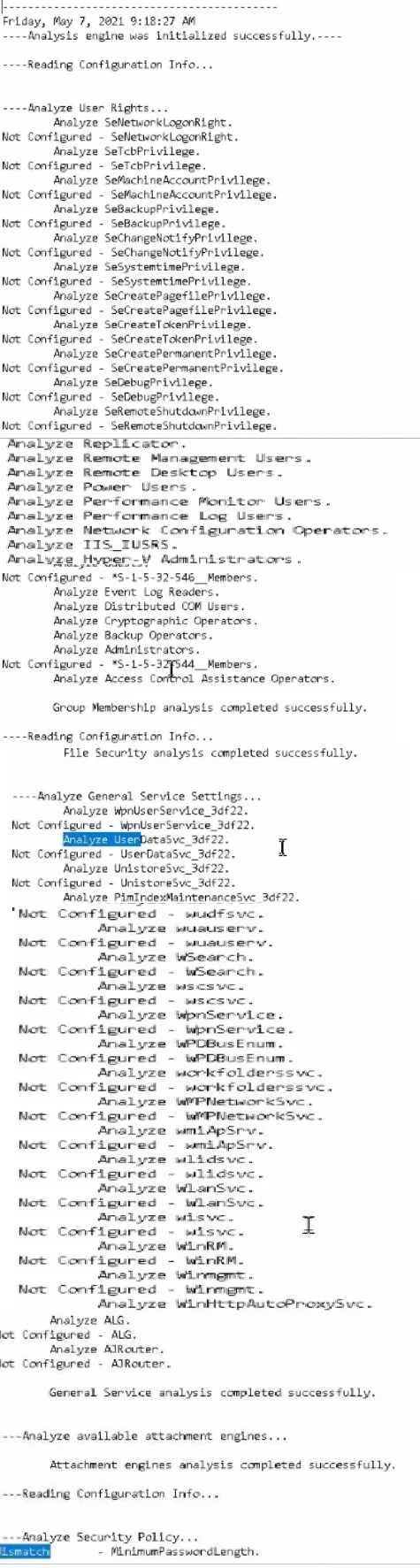
Using PowerShell ISE running as an Administrator, navigate to the C:\hlindows\security\tevplatesdirectory. Use secedit.exe in analyze mode to compare the temp.sdb and uorkstdtionSecureTmplate.inf files, and output the findings to a file called log.txt. Which configuration setting under Analyze User Rights reports a mismatch? Hints: Use files located in the C \windows\security\templates\ directory The log. txt file will be created in the directory the secedit.exe command is run from
Exhibit
Options
- ARemoteAccess
- B稴-l-5-32-544__ Members
- CEnable Admin Account
- DUseManger
- EAuditSystemEvents
- FAuditDSAccess.
- GSeSecurityPrivilege
- HSeinteractivelogonRight
- ISeServiceLogonRight:
- JlockoutBadCount
How the community answered
(22 responses)- D5% (1)
- G9% (2)
- I14% (3)
- J73% (16)
Why each option
This hands-on lab requires running secedit.exe in analyze mode to compare a security template against a database, then reviewing the output log to identify which setting has a mismatch.
RemoteAccess is a dial-up or VPN-related policy entry, not a User Rights assignment that appears as a mismatch in this specific template comparison.
The S-1-5-32-544 Members entry relates to local Administrators group membership and is not flagged as a mismatched User Rights value in the secedit analysis of these files.
Enable Admin Account is an account options setting rather than a User Rights assignment, and it does not produce a mismatch in this particular template analysis.
UseManger is not a recognized standard security policy setting and does not appear as a mismatch in the secedit analysis output.
AuditSystemEvents is an audit policy setting, not a User Rights assignment, and is not the value flagged as mismatched in this comparison.
AuditDSAccess is an audit policy for directory service access events rather than a User Rights setting, and does not represent the mismatch found.
SeSecurityPrivilege grants the 'Manage auditing and security log' right, but this right is not the one reported as mismatched between the two files in the lab output.
SeInteractiveLogonRight controls who can log on locally but is not the setting shown as mismatched in the secedit analysis of the specified template and database.
SeServiceLogonRight controls which accounts can log on as a service, but this right does not show a mismatch in the comparison between temp.sdb and workstationSecureTemplate.inf.
lockoutBadCount defines how many consecutive failed logon attempts are permitted before an account is locked, and the secedit /analyze output reveals this value differs between workstationSecureTemplate.inf and the temp.sdb database. This mismatch is surfaced in the log.txt file because the template enforces a stricter lockout threshold than the value stored in the security database.
Concept tested: secedit.exe security template analysis and policy mismatch detection
Source: https://learn.microsoft.com/en-us/windows-server/administration/windows-commands/secedit-analyze
Topics
Community Discussion
No community discussion yet for this question.
