GSEC · Question #86
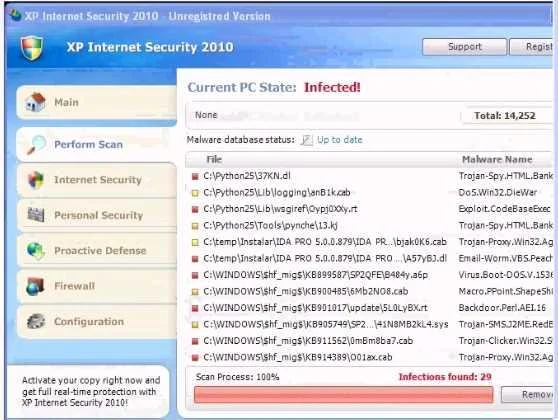
Analyze the screenshot below. What is the purpose of this message?
The correct answer is D. To alert the user to infected software on the computer. The message depicted is a scareware or fake security alert designed to deceive users into believing their computer is infected. This is a common social engineering tactic.
Question
Analyze the screenshot below. What is the purpose of this message?
Exhibit
Options
- ATo gather non-specific vulnerability information
- BTo get the user to download malicious software
- CTo test the browser plugins for compatibility
- DTo alert the user to infected software on the computer.
How the community answered
(22 responses)- A5% (1)
- B5% (1)
- C18% (4)
- D73% (16)
Why each option
The message depicted is a scareware or fake security alert designed to deceive users into believing their computer is infected. This is a common social engineering tactic.
The message targets a specific user with alarming, fabricated claims rather than passively collecting general vulnerability data.
While some scareware campaigns lead to downloads, the depicted message functions specifically as a fake infection alert, not a direct download prompt.
Browser plugin compatibility testing does not involve alarming security warnings and is a routine, non-threatening process.
Fake antivirus or scareware pop-ups mimic legitimate security software alerts by falsely claiming the system is infected with malware. The goal is to alarm the user with fabricated infection reports, pressuring them into taking an action such as calling a fake support number or purchasing fraudulent software.
Concept tested: Scareware and fake security alert social engineering
Source: https://www.cisa.gov/news-events/news/recognizing-and-avoiding-email-scams
Topics
Community Discussion
No community discussion yet for this question.
