
GSEC · Question #346
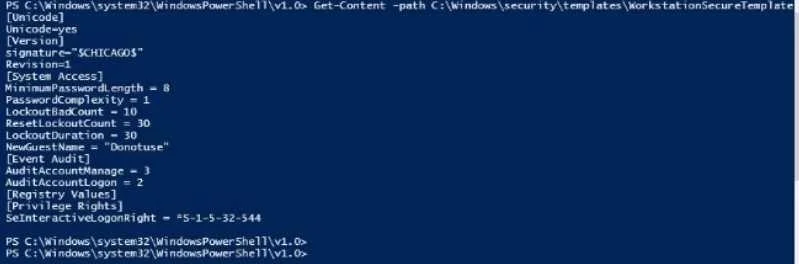
Use PowerShell ISE to examineC:\Windows\security\templates\WorkstationSecureTemplate.inf. Which setting is configured in the template?
The correct answer is A. ResetLockoutCount. Windows security template .inf files define security configurations including account lockout, audit, and user rights policies that can be inspected with PowerShell ISE.
Question
Use PowerShell ISE to examineC:\Windows\security\templates\WorkstationSecureTemplate.inf. Which setting is configured in the template?
Exhibit
Options
- AResetLockoutCount
- BNewAdministratorName
- CMinirnumPasswordAge
- DRequire logonToChangoPassword
- ESeRemotPlnteractiveLogonRlght
- FMaxRenewAge
- GAuditSystemEvents
- HEnableGuestAccount
- IAuditPolicyChange
How the community answered
(20 responses)- A85% (17)
- D10% (2)
- I5% (1)
Why each option
Windows security template .inf files define security configurations including account lockout, audit, and user rights policies that can be inspected with PowerShell ISE.
The WorkstationSecureTemplate.inf file on this system includes the ResetLockoutCount setting under the [System Access] section, which specifies the number of minutes after a failed logon attempt before the lockout counter resets to zero. This is a standard Account Lockout Policy setting defined in Windows security templates and applied via Group Policy or secedit. Its presence in the template confirms the workstation is hardened with an explicit account lockout reset interval.
NewAdministratorName is a valid security template setting for renaming the built-in Administrator account, but it is not present in this specific template file.
MinimumPasswordAge is a Password Policy setting that may appear in security templates, but it is not configured in this particular template.
RequireLogonToChangePassword is a dial-up or legacy policy option not configured in this template.
SeRemoteInteractiveLogonRight is a User Rights Assignment privilege, but it is not defined in this template.
MaxRenewAge is a Kerberos policy setting, not an account lockout setting, and is not present in this template.
AuditSystemEvents is an audit policy setting, but it is not configured within this specific security template file.
EnableGuestAccount controls the built-in Guest account state, but it is not set in this template.
AuditPolicyChange is an audit policy setting, but it is not the setting configured in this particular template.
Concept tested: Windows security template account lockout policy inspection
Source: https://learn.microsoft.com/en-us/windows/security/threat-protection/security-policy-settings/reset-account-lockout-counter-after
Topics
Community Discussion
No community discussion yet for this question.