
FCSS_SDW_AR-7.4 · Question #49
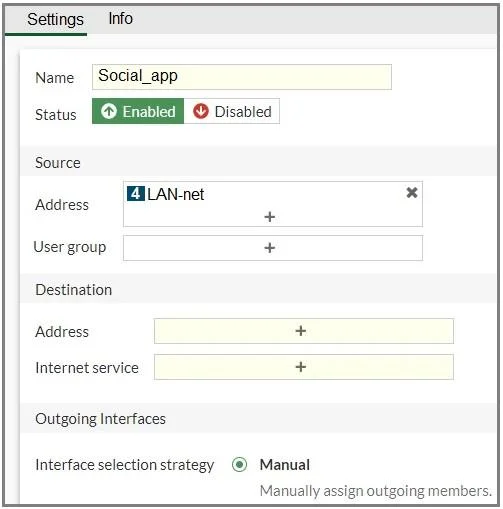
Refer to the exhibit. You configure SD-WAN on a standalone FortiGate device. You want to create an SD-WAN rule that steers Facebook and Linkedin traffic through the less costly internet link. The…
The correct answer is B. In the Internet service field, select Facebook and LinkedIn. In an SD-WAN rule, you can steer application traffic by using Internet Service Database (ISDB) entries. Facebook and LinkedIn are predefined ISDB objects in FortiGate, so the correct way is to select them in the Internet service field under Destination. This ensures that all…
Question
Refer to the exhibit. You configure SD-WAN on a standalone FortiGate device. You want to create an SD-WAN rule that steers Facebook and Linkedin traffic through the less costly internet link. The FortiGate GUI page appears as shown in the exhibit. What should you do to set Facebook and LinkedIn as destinations?
Exhibit
Options
- AInstall a license to allow applications as destinations of SD-WAN rules.
- BIn the Internet service field, select Facebook and LinkedIn.
- CEnable the applications as destinations of the SD-WAN rule feature visibility.
- DYou cannot configure applications as destinations of an SD-WAN rule on a standalone FortiGate
How the community answered
(50 responses)- A10% (5)
- B72% (36)
- C4% (2)
- D14% (7)
Explanation
In an SD-WAN rule, you can steer application traffic by using Internet Service Database (ISDB) entries. Facebook and LinkedIn are predefined ISDB objects in FortiGate, so the correct way is to select them in the Internet service field under Destination. This ensures that all traffic to these applications is matched and routed through the chosen (less costly) link.
Topics
Community Discussion
No community discussion yet for this question.