
FCSS_SDW_AR-7.4 · Question #38
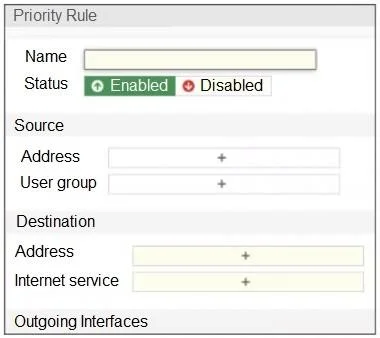
Refer to the exhibit. An administrator configures SD-WAN rules for a DIA setup using the FortiGate GUI. The page to configure the source and destination part of the rule looks as shown in the…
The correct answer is D. You must enable the feature first using the GUI menu System > Feature Visibility. To configure applications as destinations in SD-WAN rules via the GUI, the Application Control feature must be enabled in System > Feature Visibility. Once enabled, the GUI displays the application-based options.
Question
Refer to the exhibit. An administrator configures SD-WAN rules for a DIA setup using the FortiGate GUI. The page to configure the source and destination part of the rule looks as shown in the exhibit. The GUI page shows no option to configure an application as the destination of the SD-WAN rule Why?
Exhibit
Options
- AYou cannot use applications as the destination when FortiGate is used for a DIA setup.
- BFortiGate allows the configuration of applications as the destination of SD-WAN rules only on the
- CYou must enable the feature on the CLI.
- DYou must enable the feature first using the GUI menu System > Feature Visibility.
How the community answered
(26 responses)- A12% (3)
- B4% (1)
- C4% (1)
- D81% (21)
Explanation
To configure applications as destinations in SD-WAN rules via the GUI, the Application Control feature must be enabled in System > Feature Visibility. Once enabled, the GUI displays the application-based options.
Topics
Community Discussion
No community discussion yet for this question.