
FCSS_SASE_AD-25 · Question #35
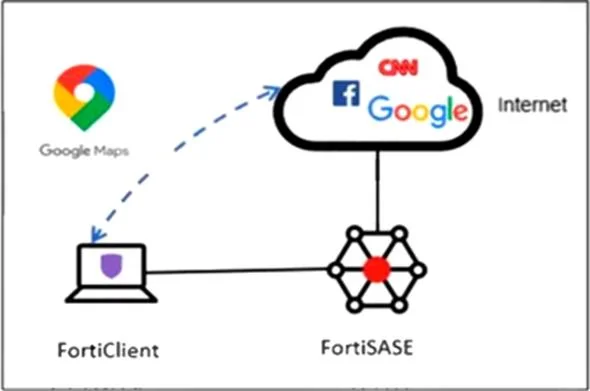
Refer to the exhibit. An organization must inspect all the endpoint internet traffic on FortiSASE, and exclude Google Maps traffic from the FortiSASE VPN tunnel and redirect it to the endpoint…
The correct answer is C. Add the Google Maps URL as a steering bypass destination in the endpoint profile. To exclude specific internet traffic (such as Google Maps) from being tunneled through FortiSASE and instead direct it out the local endpoint interface, you must configure it as a steering bypass destination in the FortiClient endpoint profile. This ensures traffic matching the…
Question
Refer to the exhibit. An organization must inspect all the endpoint internet traffic on FortiSASE, and exclude Google Maps traffic from the FortiSASE VPN tunnel and redirect it to the endpoint physical interface. Which configuration must you apply to achieve this requirement?
Exhibit
Options
- AConfigure a steering bypass tunnel firewall policy using Google Maps FQDN to exclude and
- BAdd the Google Maps URL in the zero trust network access (ZTNA) TCP access proxy forwarding
- CAdd the Google Maps URL as a steering bypass destination in the endpoint profile.
- DExempt Google Maps in URL filtering in the web filter profile.
How the community answered
(49 responses)- A6% (3)
- B12% (6)
- C80% (39)
- D2% (1)
Explanation
To exclude specific internet traffic (such as Google Maps) from being tunneled through FortiSASE and instead direct it out the local endpoint interface, you must configure it as a steering bypass destination in the FortiClient endpoint profile. This ensures traffic matching the URL bypasses the FortiSASE tunnel.
Topics
Community Discussion
No community discussion yet for this question.