
FCSS_SASE_AD-25 · Question #18
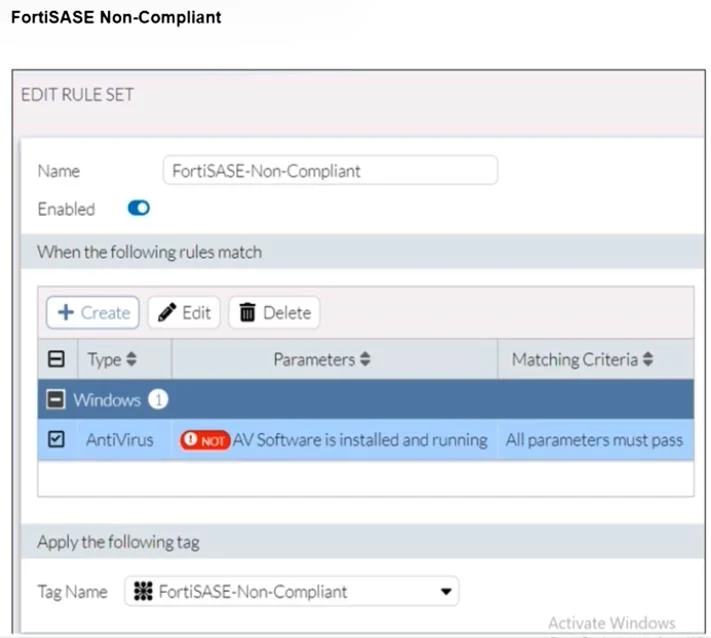
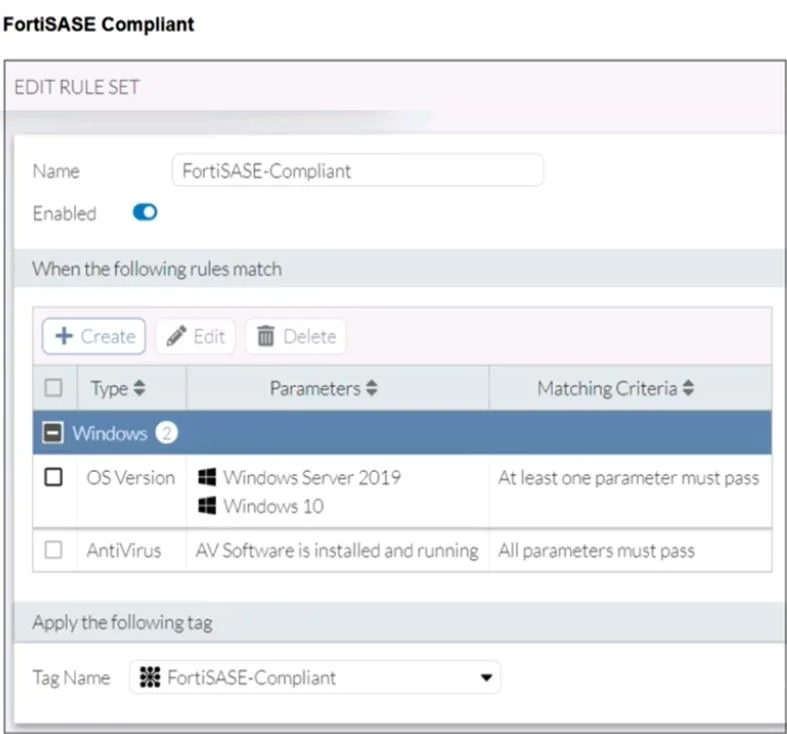
Refer to the exhibits. Antivirus is installed on a Windows 10 endpoint, but the windows application firewall is stopping it from running. What will the endpoint security posture check be?
The correct answer is A. FortiClient will tag the endpoint as FortiSASE-Non-Compliant. Although the antivirus is installed, it is not running due to the Windows application firewall blocking it. According to the FortiSASE-Non-Compliant rule, antivirus software must be both installed and running. Since this condition fails, FortiClient assigns the…
Question
Refer to the exhibits. Antivirus is installed on a Windows 10 endpoint, but the windows application firewall is stopping it from running. What will the endpoint security posture check be?
Exhibits
Options
- AFortiClient will tag the endpoint as FortiSASE-Non-Compliant.
- BFortiClient will be unmanaged from FortiSASE due to failed compliance.
- CFortiClient will trigger network lockdown on the endpoint.
- DFortiClient will prompt the user to enable antivirus.
How the community answered
(27 responses)- A74% (20)
- B4% (1)
- C15% (4)
- D7% (2)
Explanation
Although the antivirus is installed, it is not running due to the Windows application firewall blocking it. According to the FortiSASE-Non-Compliant rule, antivirus software must be both installed and running. Since this condition fails, FortiClient assigns the FortiSASE-Non-Compliant tag to the endpoint.
Topics
Community Discussion
No community discussion yet for this question.