
FCSS_NST_SE-7.4 · Question #84
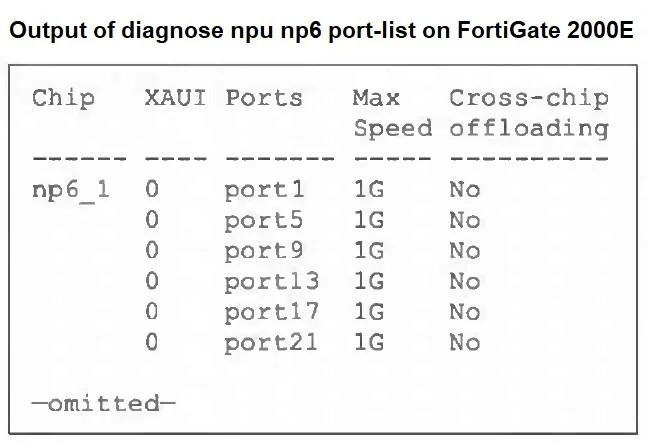
Refer to the exhibit, which shows a partial output of diagnose npu np6 port-list on FortiGate 2000E. An administrator is unable to analyze traffic flowing between port1 and port17 using the diagnose…
The correct answer is C. diagnose npu np6 port-list disable 5 17 D. diagnose npu np6 fastpath disable 1. diagnose npu np6 port-list disable 5 17 This command disables hardware offloading for traffic on ports 5 (port1) and 17 (port17) of the NP6 processor, ensuring the CPU path is used so that diagnose sniffer can capture the packets. diagnose npu np6 fastpath disable 1 Disabling…
Question
Refer to the exhibit, which shows a partial output of diagnose npu np6 port-list on FortiGate 2000E. An administrator is unable to analyze traffic flowing between port1 and port17 using the diagnose sniffer command. Which two commands allow the administrator to view the traffic? (Choose two.)
Exhibit
Options
- Aconfig firewall policy
- Bconfig system npu
- Cdiagnose npu np6 port-list disable 5 17
- Ddiagnose npu np6 fastpath disable 1
How the community answered
(41 responses)- A10% (4)
- B7% (3)
- C83% (34)
Explanation
diagnose npu np6 port-list disable 5 17 This command disables hardware offloading for traffic on ports 5 (port1) and 17 (port17) of the NP6 processor, ensuring the CPU path is used so that diagnose sniffer can capture the packets. diagnose npu np6 fastpath disable 1 Disabling the fastpath on NP6 chip 1 (np6_1) forces all traffic through the regular processing path on that chip, which allows the sniffer to see the packets.
Topics
Community Discussion
No community discussion yet for this question.