
FCSS_NST_SE-7.4 · Question #53
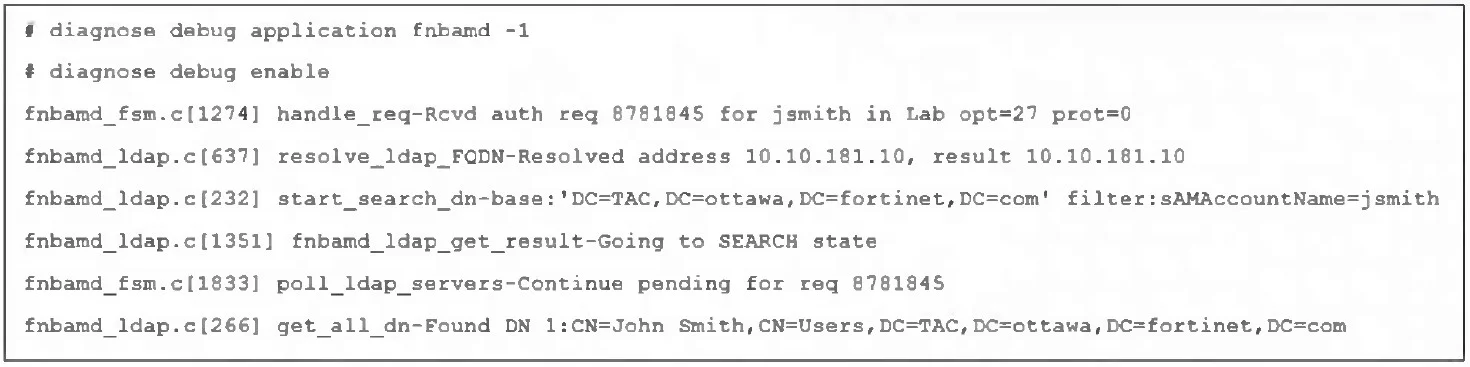
Refer to the exhibit, which shows a partial output of a real-time LDAP debug. What two conclusions can you draw from the output? (Choose two.)
The correct answer is A. The user was found in the LDAP tree, whose root is TAC.ottawa.fortinet.com. D. FortiOS is performing the second step (Search Request) in the LDAP authentication process. The log's search base is DC=TAC,DC=ottawa,DC=fortinet,DC=com and the message get_all_dn‑Found DN 1:CN=John Smith,CN=Users,... confirms the user was located under that LDAP tree (TAC.ottawa.fortinet.com). Seeing start_search_dn‑base...filter:sAMAccountName=jsmith and Going to…
Question
Refer to the exhibit, which shows a partial output of a real-time LDAP debug. What two conclusions can you draw from the output? (Choose two.)
Exhibit
Options
- AThe user was found in the LDAP tree, whose root is TAC.ottawa.fortinet.com.
- BFortiOS performs a bind to the LDAP server using the user's credentials.
- CFortiOS collects the user group information.
- DFortiOS is performing the second step (Search Request) in the LDAP authentication process.
How the community answered
(19 responses)- A79% (15)
- B5% (1)
- C16% (3)
Explanation
The log's search base is DC=TAC,DC=ottawa,DC=fortinet,DC=com and the message get_all_dn‑Found DN 1:CN=John Smith,CN=Users,... confirms the user was located under that LDAP tree (TAC.ottawa.fortinet.com). Seeing start_search_dn‑base...filter:sAMAccountName=jsmith and Going to SEARCH state shows FortiOS is executing the LDAP "Search Request" step of the bind‑and‑search authentication flow.
Topics
Community Discussion
No community discussion yet for this question.