
FCSS_LED_AR-7.6 · Question #67
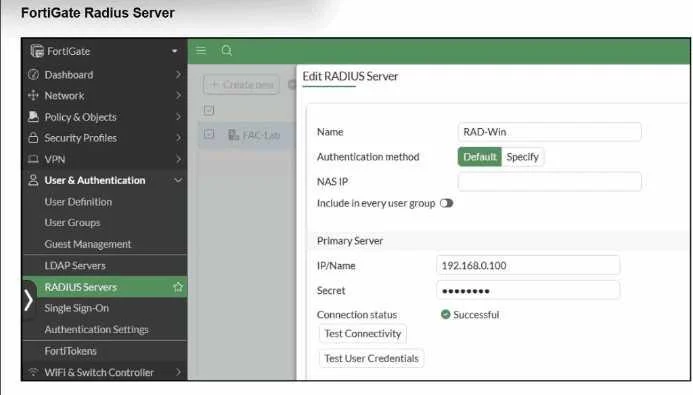
Refer to the exhibit. A RADIUS server has been successfully configured on FortiGate, which sends RADIUS authentication requests to FortiAuthenticator. FortiAuthenticator, in turn, relays the…
The correct answer is B. Enable Windows Active Directory Domain Authentication. From the exhibits and text: FortiGate -> RADIUS -> FortiAuthenticator FortiAuthenticator -> LDAP Windows -> AD diagnose test authserver radius ... papsucceeds diagnose test authserver radius ... mschap2fails This behavior matches a classic limitation documented in FortiOS: When…
Question
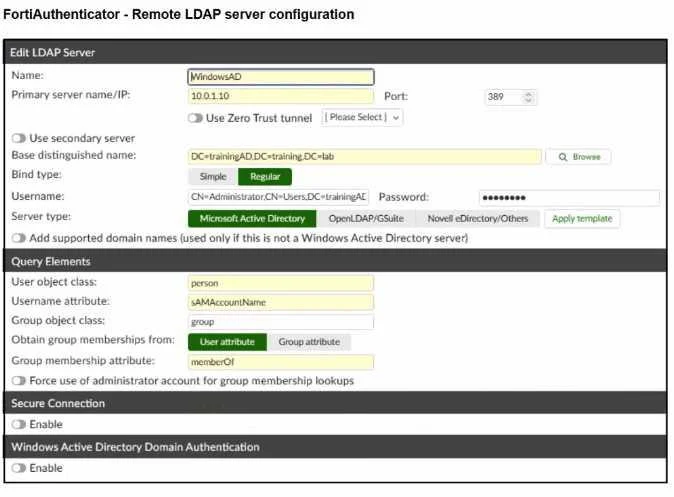
Refer to the exhibit. A RADIUS server has been successfully configured on FortiGate, which sends RADIUS authentication requests to FortiAuthenticator. FortiAuthenticator, in turn, relays the authentication using LDAP to a Windows Active Directory server. It was reported that wireless users are unable to authenticate successfully. The FortiGate configuration confirms that it can connect to the RADIUS server without issues. While testing authentication on FortiGate using the command diagnose test authserver radius, it was observed that authentication succeeds with PAP but fails with MSCHAPv2. Additionally, the Remote LDAP Server configuration on FortiAuthenticator was reviewed. Which configuration change might resolve this issue?
Exhibits

Options
- AChange the RADIUS authentication protocol to CHAP
- BEnable Windows Active Directory Domain Authentication.
- CManually add user credentials to the FortiAuthenticator local database
- DUse RADIUS attributes under the FortiGate configuration.
How the community answered
(32 responses)- A3% (1)
- B75% (24)
- C9% (3)
- D13% (4)
Explanation
From the exhibits and text: FortiGate -> RADIUS -> FortiAuthenticator FortiAuthenticator -> LDAP Windows -> AD diagnose test authserver radius ... papsucceeds diagnose test authserver radius ... mschap2fails This behavior matches a classic limitation documented in FortiOS: When usingLDAPas the back-end, the RADIUS server must usePAP. CHAP/MS-CHAPv2 arenot supportedwith plain LDAP because the server cannot validate the challenge璻esponse without access to password hashes. In the Remote LDAP server config on FortiAuthenticator, the option"Windows Active Directory Domain Authentication" is disabled.When this feature isenabled, FortiAuthenticator can talk to AD usingKerberos/NTLMinstead of a simple LDAP bind, whichdoes support MS-CHAPv2for incoming RADIUS authentications. So to allow MS-CHAPv2 all the way from FortiGate to AD, you must: Keep FortiGate using RADIUS with MS-CHAPv2 -> FortiAuthenticator EnableWindows Active Directory Domain Authenticationso FortiAuthenticator can properly validate MS-CHAPv2 against AD.
Topics
Community Discussion
No community discussion yet for this question.