
FCSS_LED_AR-7.6 · Question #65
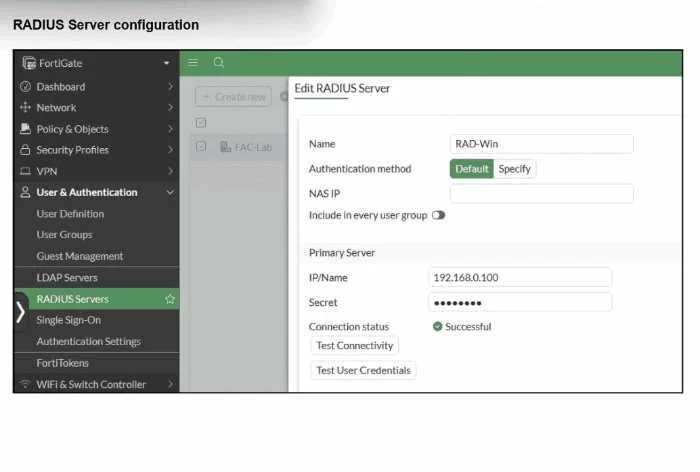
Refer to the exhibit. On FortiGate, a RADIUS server is configured to forward authentication requests to FortiAuthenticator, which acts as a RADIUS proxy. FortiAuthenticator then relays these…
The correct answer is A. Change the FortiGate authentication method to CHAP instead of MS-CHAPv2. D. Configure FortiAuthenticator to use RADIUS instead of LDAP as the back-end authentication. MS-CHAPv2 authentication fails because it requires access to NT password hashes to complete the challenge-response exchange - a requirement that standard LDAP cannot fulfill. LDAP-based authentication (the current backend) can only bind using plaintext credentials, which is why…
Question
Refer to the exhibit. On FortiGate, a RADIUS server is configured to forward authentication requests to FortiAuthenticator, which acts as a RADIUS proxy. FortiAuthenticator then relays these authentication requests to a remote Windows AD server using LDAP. While testing authentication using the CLI command diagnose test authserver. the administrator observed that authentication succeeded with PAP but failed when using MS-CHAFV2. Which two solutions can the administrator implement to enable MS-CHAPv2 authentication? (Choose two.)
Exhibit
Options
- AChange the FortiGate authentication method to CHAP instead of MS-CHAPv2.
- BEnable Windows Active Directory domain authentication on FortiAuthenticator.
- CEnable RADIUS attribute filtering on FortiAuthenticator.
- DConfigure FortiAuthenticator to use RADIUS instead of LDAP as the back-end authentication
How the community answered
(37 responses)- A68% (25)
- B22% (8)
- C11% (4)
Explanation
MS-CHAPv2 authentication fails because it requires access to NT password hashes to complete the challenge-response exchange - a requirement that standard LDAP cannot fulfill. LDAP-based authentication (the current backend) can only bind using plaintext credentials, which is why PAP succeeds (it transmits the password in cleartext that FAC can extract and use for an LDAP bind). Option D resolves this by replacing the LDAP backend with RADIUS, pointing FortiAuthenticator to Windows NPS (Network Policy Server), which has native domain access to NT hashes and can fully process MS-CHAPv2 challenges. Option A resolves this at the protocol level - CHAP uses MD5 with a plaintext password, meaning FortiAuthenticator can retrieve a reversibly-encrypted password via LDAP and compute the verification locally, whereas MS-CHAPv2's NT hash requirement is simply incompatible with LDAP's capabilities.
Option B is a distractor: enabling Windows AD domain authentication on FAC relates to FAC joining the domain for Kerberos-based scenarios, not fixing the MS-CHAPv2/LDAP incompatibility in this RADIUS proxy chain. Option C is irrelevant - RADIUS attribute filtering controls which RADIUS attributes pass through the proxy, and has no bearing on whether the underlying authentication protocol can be processed.
Memory tip: Think of it as a compatibility chain - MS-CHAPv2 needs NT hashes, LDAP can't provide them. You can either lower the protocol to what LDAP supports (CHAP → Option A) or upgrade the backend to something that has NT hash access (RADIUS/NPS → Option D).
Topics
Community Discussion
No community discussion yet for this question.