
FCSS_LED_AR-7.6 · Question #19
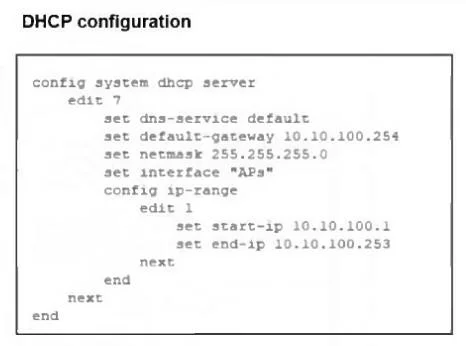
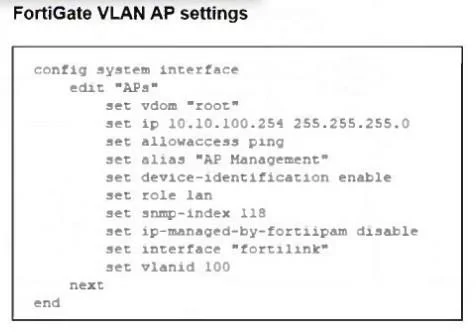
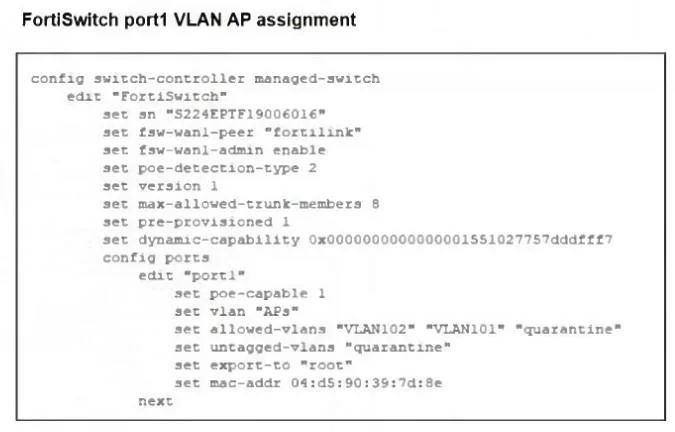
Refer to the exhibits. A FortiSwitch is successfully managed by FortiGate. FortiAP is connected to port1 of the managed FortiSwitch. On FortiGate, the VLAN AP is configured to detect and manage…
The correct answer is D. Security Fabric is disabled in the administrative access options of the VLAN. By default the CAPWAP ports are open on the FortiGate VLANs/Ports with Security Fabric Connection option enabled.
Question
Refer to the exhibits. A FortiSwitch is successfully managed by FortiGate. FortiAP is connected to port1 of the managed FortiSwitch. On FortiGate, the VLAN AP is configured to detect and manage FortiAP, along with a DHCP server for the VLAN AP. Additionally, the VLAN AP is assigned to port1 of FortiSwitch. However, FortiGate is unable to detect or manage FortiAP. Which FortiGate misconfiguration is preventing the detection of FortiAP?
Exhibits
Options
- AThe VLAN is not tagged correctly on the FortiSwitch uplink port.
- BThe FortiAP firmware is incompatible with the FortiGate firmware version.
- CThe CAPWAP ports (UDP 5246 and 5247) are not open on FortiGate.
- DSecurity Fabric is disabled in the administrative access options of the VLAN.
How the community answered
(28 responses)- A7% (2)
- B14% (4)
- C32% (9)
- D46% (13)
Explanation
By default the CAPWAP ports are open on the FortiGate VLANs/Ports with Security Fabric Connection option enabled.
Topics
Community Discussion
No community discussion yet for this question.