
Fortinet
FCSS_LED_AR-7.6 · Question #18
FCSS_LED_AR-7.6 Question #18: Real Exam Question with Answer & Explanation
Sign in or unlock FCSS_LED_AR-7.6 to reveal the answer and full explanation for question #18. The question stem and answer options stay visible for context.
Question
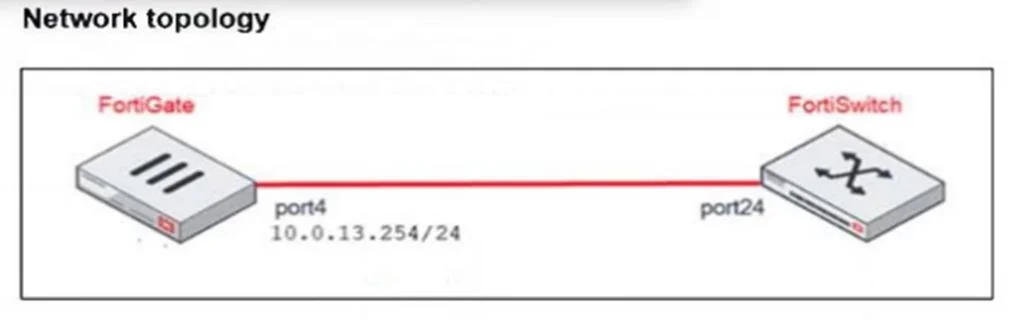
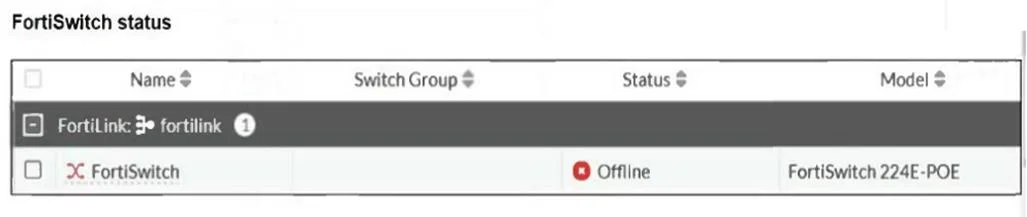
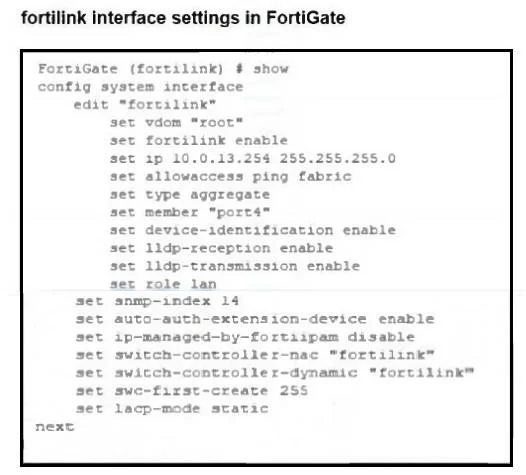
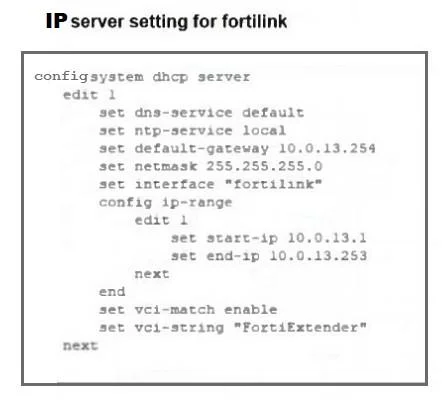
Refer to the exhibits. You are adding a new FortiSwitch to FortiGate for management. All necessary settings have been configured on FortiGate, but FortiSwitch remains offline. The cabling has been verified and is correctly connected. Which misconfiguration might be preventing FortiGate from detecting FortiSwitch?
Exhibits
Options
- AThe DHCP server setting vci-string is misconfigured.
- BThe Fortilink interface has the wrong interface member.
- CThe Fortilink interface setting ip-managed-by-fortiipam must be enabled.
- DThe Fortilink interface setting type must be physical.
Unlock FCSS_LED_AR-7.6 to see the answer
You've previewed enough free FCSS_LED_AR-7.6 questions. Unlock FCSS_LED_AR-7.6 for full answers, explanations, the timed quiz mode, progress tracking, and the master PDF. Question stem and options stay visible so you can still see what's on the exam.