
FCSS_LED_AR-7.6 · Question #8
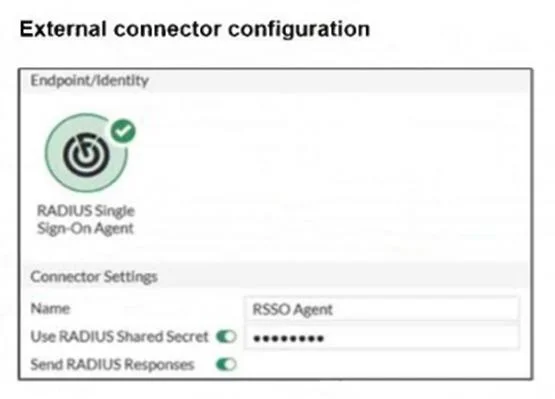
Refer to the exhibits. You have configured RADIUS single sign-on (RSSO) on a FortiGate device, ensuring that all settings are correct and the integration with the RADIUS server is correctly…
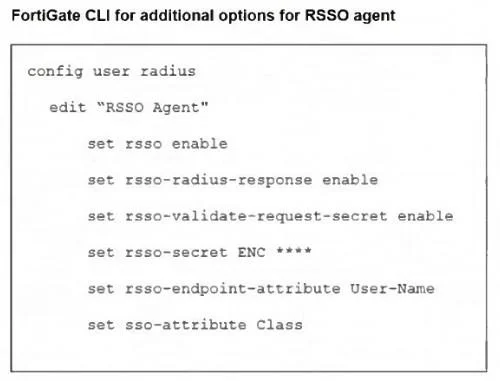
The correct answer is B. Disabled rsso-radius-response. The issue occurs because rsso-radius-response is disabled. Without enabling RADIUS response accounting, FortiGate does not send session logs or detailed usage information back to the RADIUS server, even though authentication and RSSO activity work. Enabling set rsso-radius…
Question
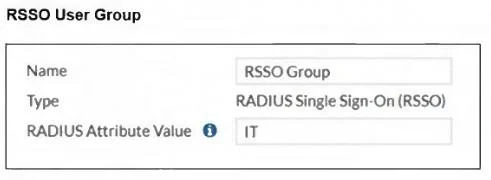
Refer to the exhibits. You have configured RADIUS single sign-on (RSSO) on a FortiGate device, ensuring that all settings are correct and the integration with the RADIUS server is correctly established. Communication between FortiGate and the RADIUS server is happening through port3. After testing, you notice that while user authentication and RSSO activity are functioning as expected, the RADIUS server does not display session logs or detailed usage information. What is the most likely reason for this issue?
Exhibits
Options
- AMisconfigured RADIUS shared password
- BDisabled rsso-radius-response
- CMisconfigured interface port3
- DMismatched user radius sso-attribute and radius attribute value
How the community answered
(28 responses)- A14% (4)
- B50% (14)
- C29% (8)
- D7% (2)
Explanation
The issue occurs because rsso-radius-response is disabled. Without enabling RADIUS response accounting, FortiGate does not send session logs or detailed usage information back to the RADIUS server, even though authentication and RSSO activity work. Enabling set rsso-radius- response enable ensures the RADIUS server receives accounting details.
Topics
Community Discussion
No community discussion yet for this question.