
FCSS_LED_AR-7.6 · Question #5
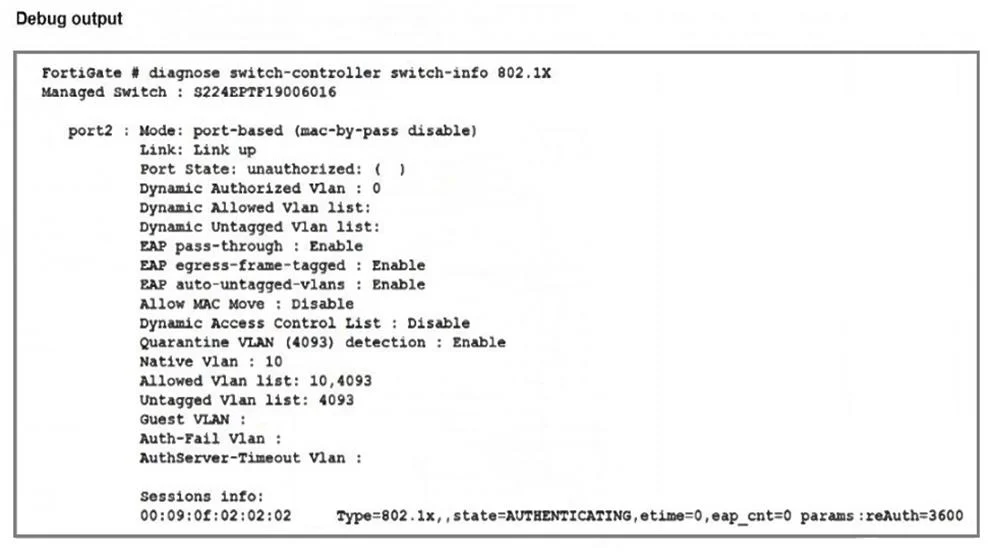
Refer to the exhibit. Port2 on FortiSwitch is configured with an 802.1X authentication security policy, but a device connected to port2 is unable to access the network. The administrator has…
The correct answer is A. The device is not configured for 802.1X authentication. C. The device does not support 802.1X authentication. The port is in state AUTHENTICATING with eap_cnt=0, indicating no 802.1X EAP exchange occurred. Since MAB is disabled (mac-by-pass disable), a device that is not configured for 802.1X or does not support 802.1X cannot gain access.
Question
Refer to the exhibit. Port2 on FortiSwitch is configured with an 802.1X authentication security policy, but a device connected to port2 is unable to access the network. The administrator has gathered the diagnose output, as shown in the exhibit, to investigate the issue. Which two scenarios could explain why the device is failing to gain network access? (Choose two.)
Exhibit
Options
- AThe device is not configured for 802.1X authentication.
- BThe device has been quarantined for 3600 seconds.
- CThe device does not support 802.1X authentication.
- DThe device has been assigned the guest VLAN.
How the community answered
(18 responses)- A56% (10)
- B28% (5)
- D17% (3)
Explanation
The port is in state AUTHENTICATING with eap_cnt=0, indicating no 802.1X EAP exchange occurred. Since MAB is disabled (mac-by-pass disable), a device that is not configured for 802.1X or does not support 802.1X cannot gain access.
Topics
Community Discussion
No community discussion yet for this question.