
FCP_FMG_AD-7.6 · Question #69
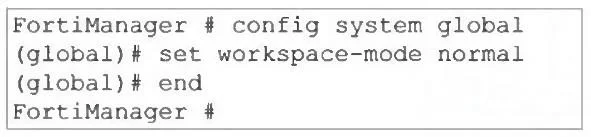
Refer to the exhibit. What are two results from the configuration shown in the exhibit? (Choose two.)
The correct answer is A. The same administrator can lock more than one ADOM at the same time. B. Multiple administrators can lock and work on separate AOMs at the same time. The CLI command set workspace-mode normal configures FortiManager to use normal workspace mode, which allows: - A single administrator to lock multiple ADOMs simultaneously, since there’s no restriction on per-user ADOM access in this mode. - Multiple administrators to work…
Question
Refer to the exhibit. What are two results from the configuration shown in the exhibit? (Choose two.)
Exhibit
Options
- AThe same administrator can lock more than one ADOM at the same time.
- BMultiple administrators can lock and work on separate AOMs at the same time.
- CAll changes must be approved before they can be installed on a device.
- DConcurrent read-write access to an ADOM is disabled.
How the community answered
(24 responses)- A83% (20)
- C4% (1)
- D13% (3)
Explanation
The CLI command set workspace-mode normal configures FortiManager to use normal workspace mode, which allows: - A single administrator to lock multiple ADOMs simultaneously, since there’s no restriction on per-user ADOM access in this mode. - Multiple administrators to work concurrently on different ADOMs, each locking their own ADOM
Topics
Community Discussion
No community discussion yet for this question.