
FCP_FMG_AD-7.6 · Question #21
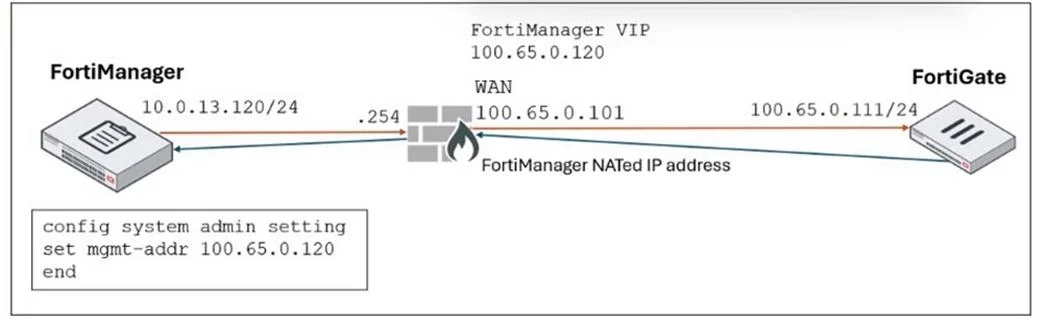
Refer to the exhibit. FortiManager is operating behind a network address translation (NAT) device, and the administrator configured the FortiManager NATed IP address under the FortiManager system…
The correct answer is D. FortiManager sets the 100.65.0.120 IP address on FortiGate. When FortiManager is behind a NAT device, setting the NATed IP address (100.65.0.120) in the system admin settings causes FortiManager to use that NATed IP address for communication and configuration with FortiGate during discovery and management operations.
Question
Refer to the exhibit. FortiManager is operating behind a network address translation (NAT) device, and the administrator configured the FortiManager NATed IP address under the FortiManager system administration settings. What is the expected result during discovery?
Exhibit
Options
- AFortiManager sets both the 100.65.0.120 IP address and 10.0.13.120 IP address on FortiGate.
- BFortiManager sets both the 100.65.0.120 IP address and 100.65.0.101 IP address on FortiGate.
- CFortiManager sets the 100.65.0.101 IP address on FortiGate.
- DFortiManager sets the 100.65.0.120 IP address on FortiGate.
How the community answered
(52 responses)- A4% (2)
- B17% (9)
- C8% (4)
- D71% (37)
Explanation
When FortiManager is behind a NAT device, setting the NATed IP address (100.65.0.120) in the system admin settings causes FortiManager to use that NATed IP address for communication and configuration with FortiGate during discovery and management operations.
Topics
Community Discussion
No community discussion yet for this question.