
FCP_FGT_AD-7.6 · Question #32
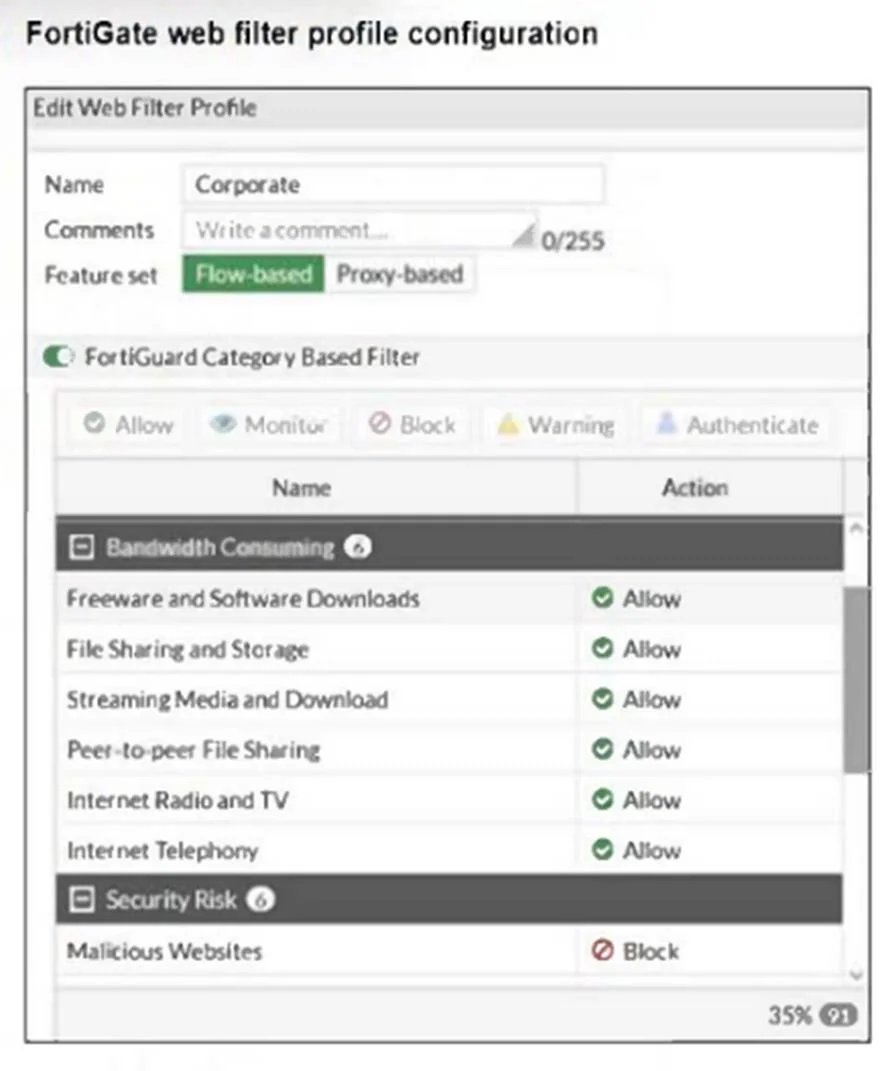
Refer to the exhibit. The exhibit shows the FortiGuard Category Based Filter section of a corporate web filter profile. An administrator must block access to download.com, which belongs to the…
The correct answer is A. Configure a static URL filter entry for download.com with Type and Action set to Wildcard and B. Configure a web override rating for download.com and select Malicious Websites as the. You can create a web rating override to change the website category to someone that is blocked in the web filter profile You can enable the URL Filter in the Web Filter Profile and block the website.
Question
Refer to the exhibit. The exhibit shows the FortiGuard Category Based Filter section of a corporate web filter profile. An administrator must block access to download.com, which belongs to the Freeware and Software Downloads category. The administrator must also allow other websites in the same category. What are two solutions for satisfying the requirement? (Choose two.)
Exhibit
Options
- AConfigure a static URL filter entry for download.com with Type and Action set to Wildcard and
- BConfigure a web override rating for download.com and select Malicious Websites as the
- CConfigure a separate firewall policy with action Deny and an FQDN address object
- DSet the Freeware and Software Downloads category Action to Warning.
How the community answered
(29 responses)- A83% (24)
- C7% (2)
- D10% (3)
Explanation
You can create a web rating override to change the website category to someone that is blocked in the web filter profile You can enable the URL Filter in the Web Filter Profile and block the website.
Topics
Community Discussion
No community discussion yet for this question.