
FCP_FGT_AD-7.6 · Question #31
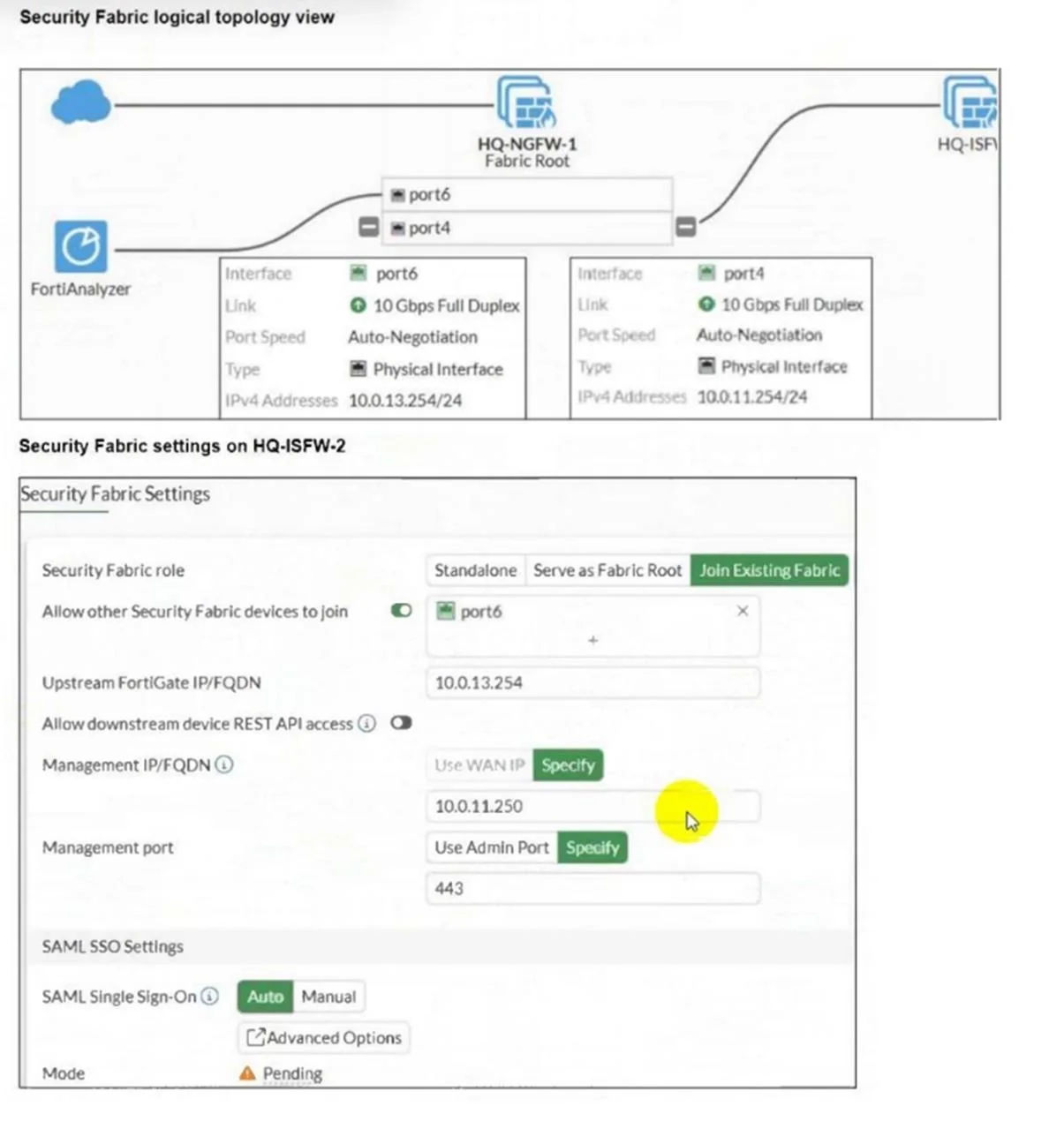
Refer to the exhibits. An administrator wants to add HQ-ISFW-2 in the Security Fabric. HQ-ISFW- 2 is in the same subnet as HQ-ISFW. After configuring the Security Fabric settings on HQ-ISFW- 2, the…
The correct answer is A. Upstream FortiGate IP must be set to 10.0.11.254. C. HQ-ISFW-2 must be authorized on HQ-ISFW. The Upstream FortiGate IP should match the IP address of the Fabric Root interface, which is 10.0.11.254, not 10.0.13.254. The new device (HQ-ISFW-2) must be authorized on the Fabric Root (HQ-ISFW) before it can join the Security Fabric, otherwise the status remains pending.
Question
Refer to the exhibits. An administrator wants to add HQ-ISFW-2 in the Security Fabric. HQ-ISFW- 2 is in the same subnet as HQ-ISFW. After configuring the Security Fabric settings on HQ-ISFW- 2, the status stays Pending. What can be the two possible reasons? (Choose two.)
Exhibit
Options
- AUpstream FortiGate IP must be set to 10.0.11.254.
- BSAML Single Sign-On must be set to Manual.
- CHQ-ISFW-2 must be authorized on HQ-ISFW.
- DManagement IP must be set to 10.0.13.254.
How the community answered
(41 responses)- A73% (30)
- B10% (4)
- D17% (7)
Explanation
The Upstream FortiGate IP should match the IP address of the Fabric Root interface, which is 10.0.11.254, not 10.0.13.254. The new device (HQ-ISFW-2) must be authorized on the Fabric Root (HQ-ISFW) before it can join the Security Fabric, otherwise the status remains pending.
Topics
Community Discussion
No community discussion yet for this question.