
FCP_FGT_AD-7.6 · Question #90
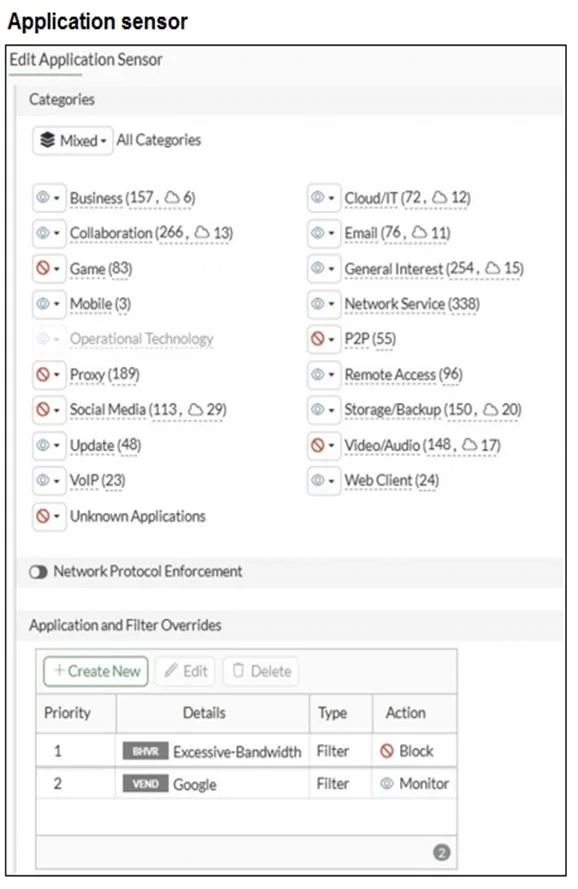
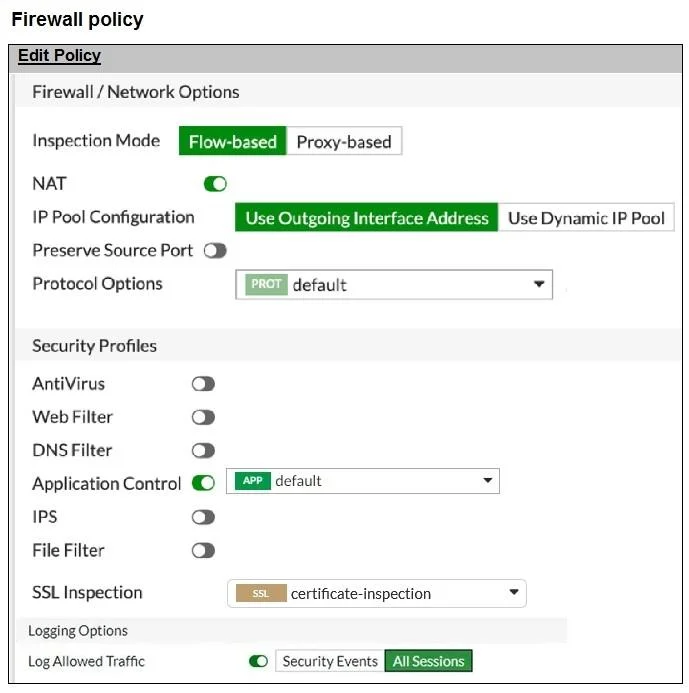
Refer to the exhibits. You have implemented the application sensor and the corresponding firewall policy as shown in the exhibits. What would you do to resolve this issue?
The correct answer is C. Move up Google in the Application and Filter Overrides section to set its priority to 1. In the Application and Filter Overrides, the Excessive-Bandwidth filter (set to Block) is priority 1, and Google (set to Monitor) is priority 2. Since overrides are evaluated by priority, Google traffic is being blocked by the higher-priority rule. Moving Google to the top…
Question
Refer to the exhibits. You have implemented the application sensor and the corresponding firewall policy as shown in the exhibits. What would you do to resolve this issue?
Exhibits
Options
- AChange the Inspection mode to Proxy-based.
- BSet SSL inspection to deep-content-inspection.
- CMove up Google in the Application and Filter Overrides section to set its priority to 1.
- DAdd Google.com to the URL category in the security profile.
How the community answered
(49 responses)- A14% (7)
- B2% (1)
- C78% (38)
- D6% (3)
Explanation
In the Application and Filter Overrides, the Excessive-Bandwidth filter (set to Block) is priority 1, and Google (set to Monitor) is priority 2. Since overrides are evaluated by priority, Google traffic is being blocked by the higher-priority rule. Moving Google to the top (priority 1) ensures it is matched first, allowing access while still monitoring it.
Topics
Community Discussion
No community discussion yet for this question.