
FCP_FGT_AD-7.6 · Question #28
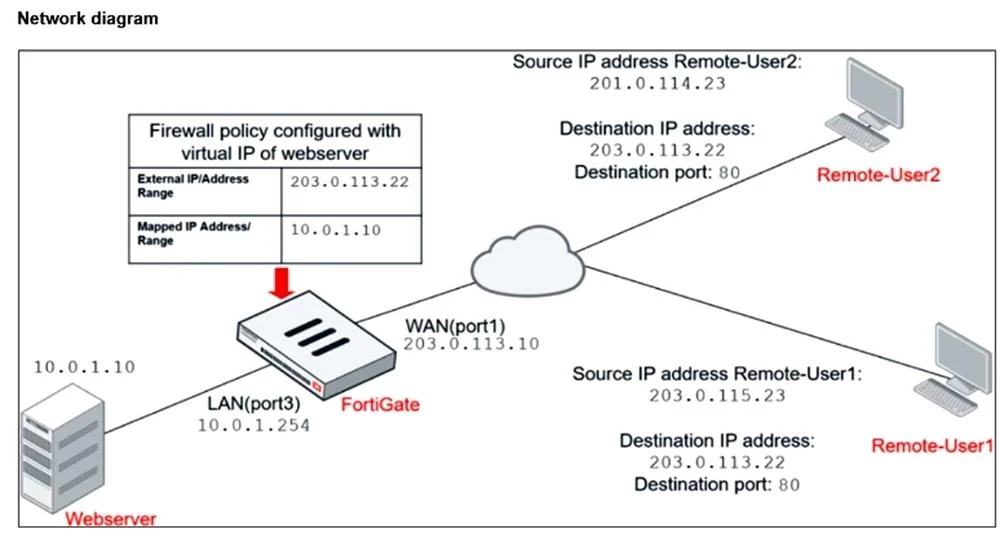
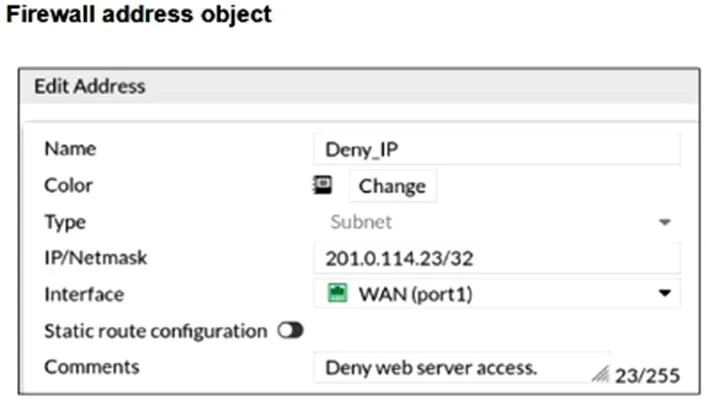
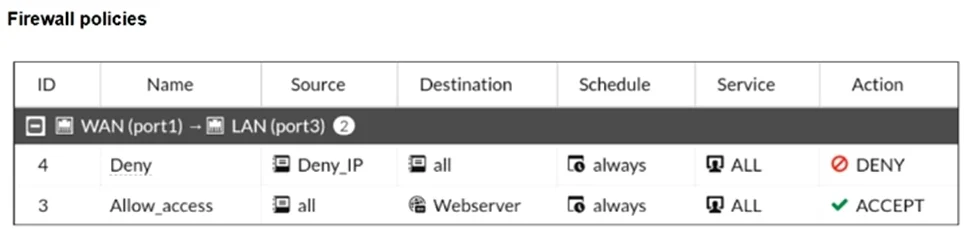
Refer to the exhibits. The exhibits show a diagram of a FortiGate device connected to the network, and the firewall configuration. An administrator created a Deny policy with default settings to…
The correct answer is C. Set the Destination address as Webserver in the Deny policy. To block Remote-User2's access to the Webserver, the deny policy must explicitly specify the Webserver as the destination address; otherwise, it denies traffic to all destinations, which is not the desired behavior.
Question
Refer to the exhibits. The exhibits show a diagram of a FortiGate device connected to the network, and the firewall configuration. An administrator created a Deny policy with default settings to deny Webserver access for Remote-User2. The policy should work such that Remote-User1 must be able to access the Webserver while preventing Remote-User2 from accessing the Webserver. Which additional configuration can the administrator add to a deny firewall policy, beyond the default behavior, to block Remote-User2 from accessing the Webserver?
Exhibits
Options
- ADisable match-vip in the Allow_access policy
- BConfigure a One-to-One IP Pool object in a new policy.
- CSet the Destination address as Webserver in the Deny policy.
- DSet the Destination address as Deny_IP in the Allow_access policy.
How the community answered
(49 responses)- A4% (2)
- B2% (1)
- C84% (41)
- D10% (5)
Explanation
To block Remote-User2's access to the Webserver, the deny policy must explicitly specify the Webserver as the destination address; otherwise, it denies traffic to all destinations, which is not the desired behavior.
Topics
Community Discussion
No community discussion yet for this question.