
Fortinet
FCP_FGT_AD-7.6 · Question #120
Refer to the exhibit. FortiGate has two separate firewall policies for Sales and Engineering to access the same web server with the same security profiles. Which action must the administrator…
The correct answer is B. Enable Multiple Interface Policies to select port1 and port2 in the same firewall policy. However, you can enable the Multiple Interface Policies option on the Feature Visibility page to disable the single interface restriction.
Submitted by fatima_kr· Apr 18, 2026Firewall policies and authentication
Question
Refer to the exhibit. FortiGate has two separate firewall policies for Sales and Engineering to access the same web server with the same security profiles. Which action must the administrator perform to consolidate the two policies into one?
Exhibit
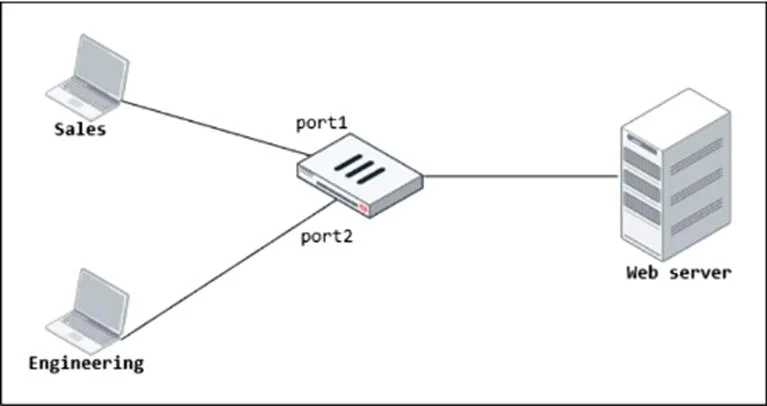
Options
- ACreate an Interface Group that includes port1 and port2 to create a single firewall policy.
- BEnable Multiple Interface Policies to select port1 and port2 in the same firewall policy.
- CReplace port1 and port2 with the any interface in a single firewall policy.
- DSelect port1 and port2 subnets in a single firewall policy.
How the community answered
(34 responses)- A9% (3)
- B74% (25)
- C3% (1)
- D15% (5)
Explanation
However, you can enable the Multiple Interface Policies option on the Feature Visibility page to disable the single interface restriction.
Topics
#Firewall Policy#Policy Consolidation#Source Interface#FortiGate Features
Community Discussion
No community discussion yet for this question.