
FCP_FGT_AD-7.4 · Question #89
Refer to the exhibits. The SSL VPN connection fails when a user attempts to connect to it. What should the user do to successfully connect to the SSL VPN?
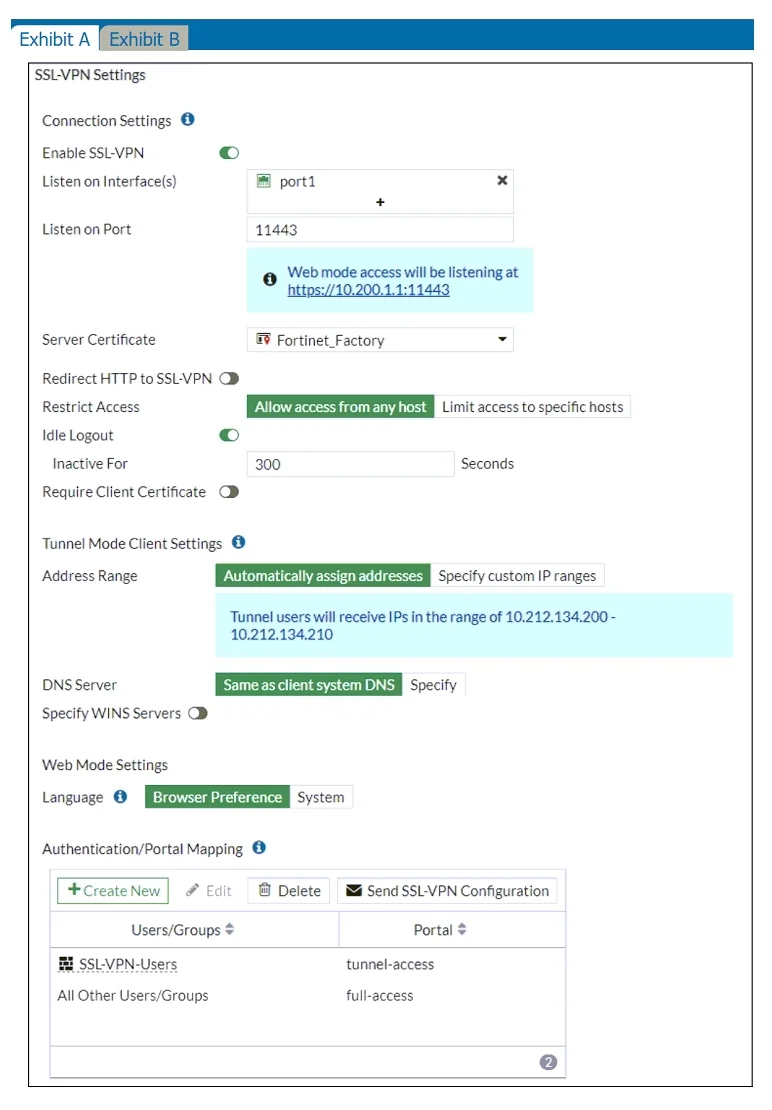
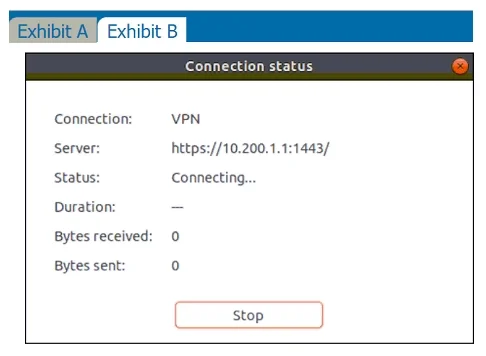
The correct answer is D. Change the SSL VPN port on the client. The SSL VPN is configured to listen on port 11443 on the FortiGate device, as shown in the SSL VPN settings in the exhibit. However, the user is attempting to connect to the server using port 1443, as displayed in the VPN connection status. The mismatch between the ports is…
Question
Refer to the exhibits. The SSL VPN connection fails when a user attempts to connect to it. What should the user do to successfully connect to the SSL VPN?
Exhibits
Options
- AChange the SSL VPN portal to the tunnel.
- BChange the idle timeout.
- CChange the server IP address.
- DChange the SSL VPN port on the client.
How the community answered
(32 responses)- A3% (1)
- B16% (5)
- C6% (2)
- D75% (24)
Explanation
The SSL VPN is configured to listen on port 11443 on the FortiGate device, as shown in the SSL VPN settings in the exhibit. However, the user is attempting to connect to the server using port 1443, as displayed in the VPN connection status. The mismatch between the ports is causing the connection failure. To resolve this, the user should change the client configuration to use port 11443 to match the FortiGate SSL VPN configuration.
Topics
Community Discussion
No community discussion yet for this question.