
FCP_FGT_AD-7.4 · Question #13
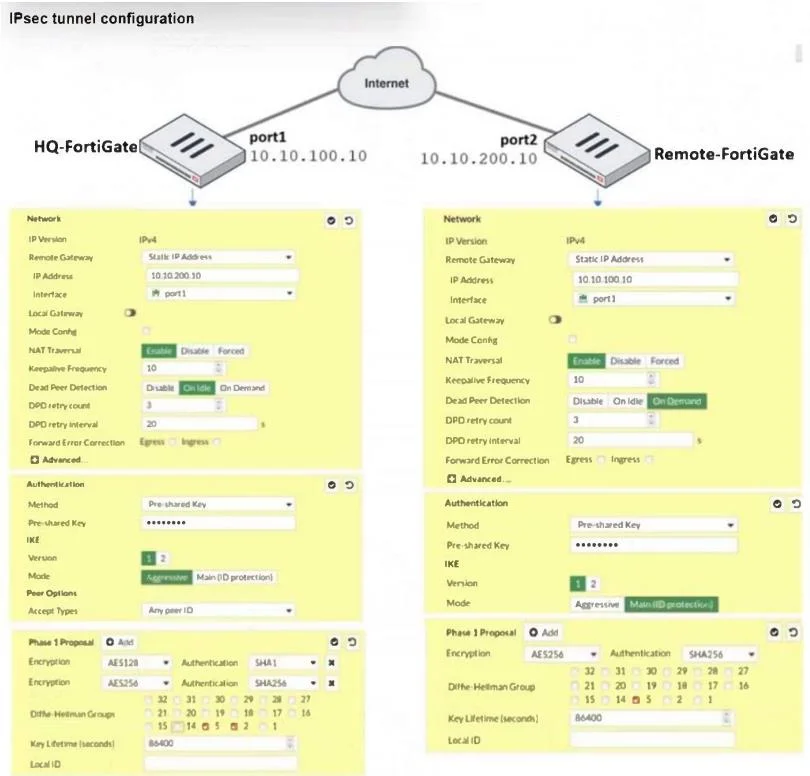
Refer to the exhibit. A network administrator is troubleshooting an IPsec tunnel between two FortiGate devices. The administrator has determined that phase 1 failed to come up. The administrator has…
The correct answer is B. On Remote-FortiGate, set port2 as Interface. D. On HQ-FortiGate, set IKE mode to Main (ID protection). In IKEv1, there are two possible modes in which the IKE SA negotiation can take place: mail and aggressive mode. The settings on both ends must agree; otherwise, phase 1 negotiation fails and both IPsec peers are not able to establish a secure channel.
Question
Refer to the exhibit. A network administrator is troubleshooting an IPsec tunnel between two FortiGate devices. The administrator has determined that phase 1 failed to come up. The administrator has also re-entered the pre-shared key on both FortiGate devices to make sure they match. Based on the phase 1 configuration and the diagram shown in the exhibit, which two configuration changes can the administrator make to bring phase 1 up? (Choose two.)
Exhibit
Options
- AOn HQ-FortiGate, disable Diffie-Helman group 2.
- BOn Remote-FortiGate, set port2 as Interface.
- COn both FortiGate devices, set Dead Peer Detection to On Demand.
- DOn HQ-FortiGate, set IKE mode to Main (ID protection).
How the community answered
(30 responses)- A7% (2)
- B83% (25)
- C10% (3)
Explanation
In IKEv1, there are two possible modes in which the IKE SA negotiation can take place: mail and aggressive mode. The settings on both ends must agree; otherwise, phase 1 negotiation fails and both IPsec peers are not able to establish a secure channel.
Topics
Community Discussion
No community discussion yet for this question.