
FCP_FGT_AD-7.4 · Question #88
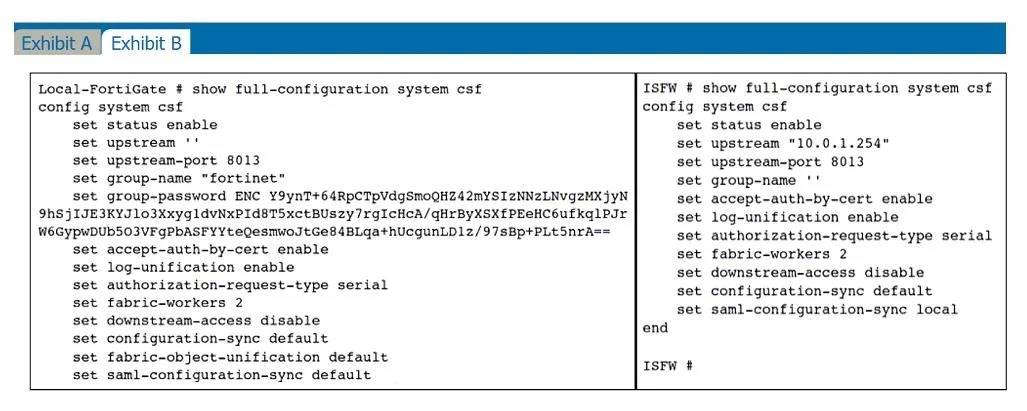
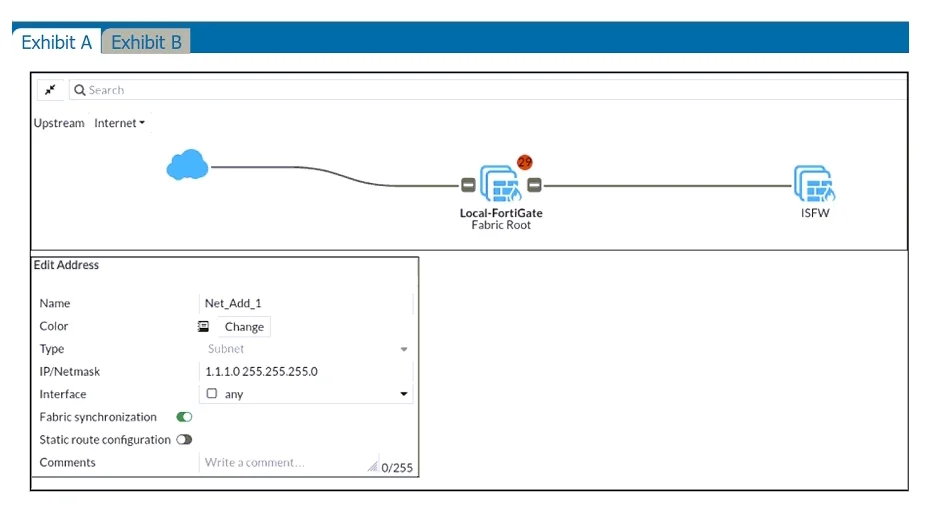
Refer to the exhibits. An administrator creates a new address object on the root FortiGate (Local-FortiGate) in the security fabric. After synchronization, this object is not available on the…
The correct answer is A. Change the csf setting on Local-FortiGate (root) to sec fabric-object-unification default. The current setting for the root FortiGate (Local-FortiGate) is fabric-object-unification local, which means that new address objects are not shared across the security fabric. Changing this setting to fabric-object-unification default will allow address objects to be…
Question
Refer to the exhibits. An administrator creates a new address object on the root FortiGate (Local-FortiGate) in the security fabric. After synchronization, this object is not available on the downstream FortiGate (ISFW). What must the administrator do to synchronize the address object?
Exhibits
Options
- AChange the csf setting on Local-FortiGate (root) to sec fabric-object-unification default.
- BChange the csf setting on both devices to sec downscream-access enable.
- CChange the csf setting on ISFW (downstream) to sec auchorizacion-requesc-cype certificace.
- DChange the csf setting on ISFW (downstream) to sec configuration-sync local.
How the community answered
(14 responses)- A86% (12)
- B7% (1)
- C7% (1)
Explanation
The current setting for the root FortiGate (Local-FortiGate) is fabric-object-unification local, which means that new address objects are not shared across the security fabric. Changing this setting to fabric-object-unification default will allow address objects to be synchronized and shared with downstream devices like the ISFW.
Topics
Community Discussion
No community discussion yet for this question.