
FCP_FGT_AD-7.4 · Question #22
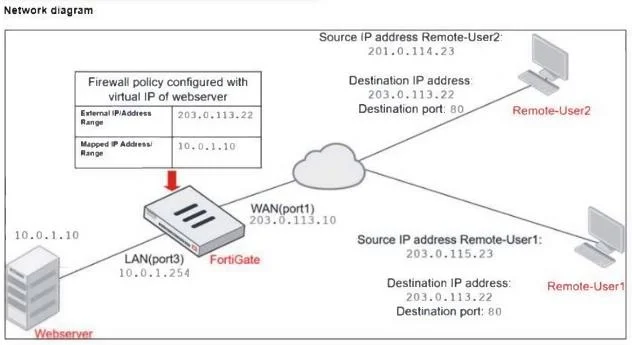
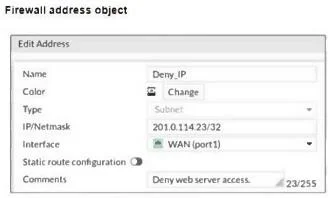
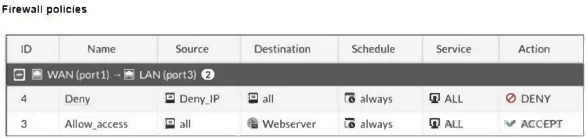
Refer to the exhibits. The exhibits show a diagram of a FortiGate device connected to the network, and the firewall configuration. An administrator created a Deny policy with default settings to…
The correct answer is A. Enable match-vip in the Deny policy. B. Set the Destination address as Webserver in the Deny policy. To deny access to the web server for Remote-User2 while allowing Remote-User1 to access the same web server, two configuration changes can be made: Enable match-vip in the Deny policy: By enabling the match-vip option in the Deny policy, the FortiGate will check for virtual IP…
Question
Refer to the exhibits. The exhibits show a diagram of a FortiGate device connected to the network, and the firewall configuration. An administrator created a Deny policy with default settings to deny Webserver access for Remote-User2. The policy should work such that Remote-User1 must be able to access the Webserver while preventing Remote-User2 from accessing the Webserver. Which two configuration changes can the administrator make to the policy to deny Webserver access for Remote-User2? (Choose two.)
Exhibits
Options
- AEnable match-vip in the Deny policy.
- BSet the Destination address as Webserver in the Deny policy.
- CDisable match-vip in the Deny policy.
- DSet the Destination address as Deny_IP in the Allow_access policy.
How the community answered
(41 responses)- A78% (32)
- C7% (3)
- D15% (6)
Explanation
To deny access to the web server for Remote-User2 while allowing Remote-User1 to access the same web server, two configuration changes can be made: Enable match-vip in the Deny policy: By enabling the match-vip option in the Deny policy, the FortiGate will check for virtual IP (VIP) objects during policy matching. This setting allows the firewall policy to correctly identify and block traffic directed to a specific mapped IP address, such as the web server, when using a VIP Set the Destination address as Webserver in the Deny policy: Setting the Destination address to "Webserver" in the Deny policy ensures that the policy specifically targets traffic attempting to reach the web server. This configuration helps to precisely control which traffic should be blocked, focusing the Deny policy on the intended destination.
Topics
Community Discussion
No community discussion yet for this question.