
FCP_FGT_AD-7.4 · Question #28
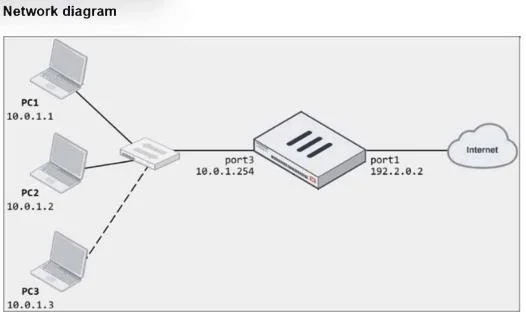
Refer to the exhibits. The exhibits show a diagram of a FortiGate device connected to the network, as well as the firewall policy and IP pool configuration on the FortiGate device. Two PCs, PC1 and…
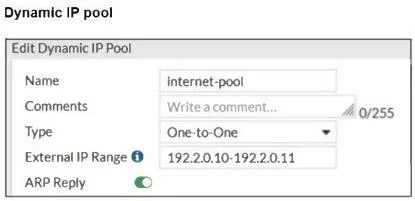
The correct answer is B. In the IP pool configuration, set the ending IP to 192.2.0.12: The current IP pool range is D. In the IP pool configuration, set type to overload: Instead of using a one-to-one NAT, changing. To resolve the issue of PC3 not being able to access the internet, the administrator needs to adjust the IP pool configuration or the firewall policy. The following two options will fix the connectivity issue: 192.2.0.10-192.2.0.11, which only provides two IP addresses for…
Question
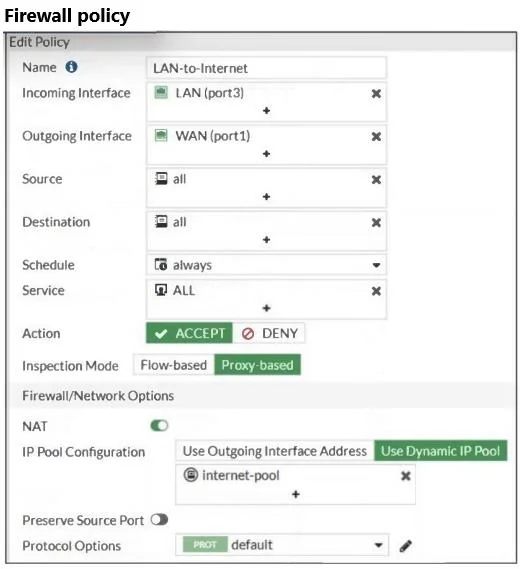
Refer to the exhibits. The exhibits show a diagram of a FortiGate device connected to the network, as well as the firewall policy and IP pool configuration on the FortiGate device. Two PCs, PC1 and PC2, are connected behind FortiGate and can access the internet successfully. However, when the administrator adds a third PC to the network (PC3), the PC cannot connect to the internet. Based on the information shown in the exhibit, which two configuration options can the administrator use to fix the connectivity issue for PC3? (Choose two.)
Exhibits
Options
- AIn the firewall policy configuration, add 10.0.1.3 as an address object in the source field.
- BIn the IP pool configuration, set the ending IP to 192.2.0.12: The current IP pool range is
- CConfigure another firewall policy that matches only the address of PC3 as source, and then place
- DIn the IP pool configuration, set type to overload: Instead of using a one-to-one NAT, changing
How the community answered
(49 responses)- A6% (3)
- B82% (40)
- C12% (6)
Explanation
To resolve the issue of PC3 not being able to access the internet, the administrator needs to adjust the IP pool configuration or the firewall policy. The following two options will fix the connectivity issue: 192.2.0.10-192.2.0.11, which only provides two IP addresses for network address translation (NAT). To allow PC3 to access the internet, the IP pool should be expanded to include an additional IP address by changing the end of the range to 192.2.0.12. the type to overload will allow multiple internal addresses (such as PC1, PC2, and PC3) to share a single external IP address. This will solve the issue without needing additional public IP
Topics
Community Discussion
No community discussion yet for this question.