
DP-500 · Question #118
You have a Power BI workspace named workspace1 that contains three reports and two dataflows. You have an Azure Data Lake Storage account named storage1. You need to integrate workspace1 and…
The correct answer is B. Delete the dataflows from workspace1. When integrating an existing Power BI workspace with Azure Data Lake Storage Gen2 for dataflow storage, any existing dataflows in the workspace must first be deleted as they cannot be migrated.
Question
Exhibit
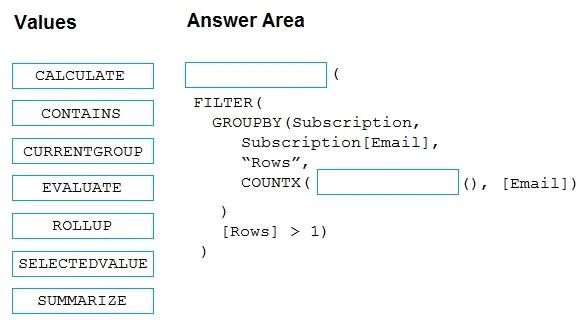
Options
- AIn storage1, create a folder named dataflows.
- BDelete the dataflows from workspace1.
- CIn storage1, create a folder named reports.
- DDelete the reports from workspace1.
How the community answered
(45 responses)- A7% (3)
- B78% (35)
- C13% (6)
- D2% (1)
Why each option
When integrating an existing Power BI workspace with Azure Data Lake Storage Gen2 for dataflow storage, any existing dataflows in the workspace must first be deleted as they cannot be migrated.
While the ADLS Gen2 account will eventually contain a 'powerbi' container and dataflows folder, creating a 'dataflows' folder manually in storage1 is not the first or a required step, as the Power BI service will manage the folder structure.
When connecting an existing Power BI workspace to an Azure Data Lake Storage Gen2 account for dataflows, any dataflows already present in the workspace cannot be migrated to the new storage location. Therefore, existing dataflows must be deleted from the workspace before the integration can proceed.
Power BI reports are not stored in Azure Data Lake Storage Gen2 as part of this specific integration, which is primarily for dataflow storage.
Deleting reports from the workspace is unnecessary when integrating with Azure Data Lake Storage Gen2 for dataflow storage, as reports are not impacted by this storage configuration.
Concept tested: Power BI dataflow ADLS Gen2 integration prerequisites
Source: https://learn.microsoft.com/en-us/power-bi/transform-model/dataflows/dataflows-azure-data-lake-storage-gen2-integration
Topics
Community Discussion
No community discussion yet for this question.