
DP-500 · Question #110
You have a Power BI tenant that uses a primary domain named fabrikam.com and contains a Power BI Premium workspace named Workspace1. Workspace1 contains a dataset named DS1. DS1 is an imported model…
The provided exam question text regarding XMLA endpoint URL completion is mismatched with the exhibit images, which depict options for Power BI dataset security (RLS/OLS) and data aggregations. Assuming the underlying intent is to identify a tool for advanced dataset security…
Question
Exhibit
Explanation
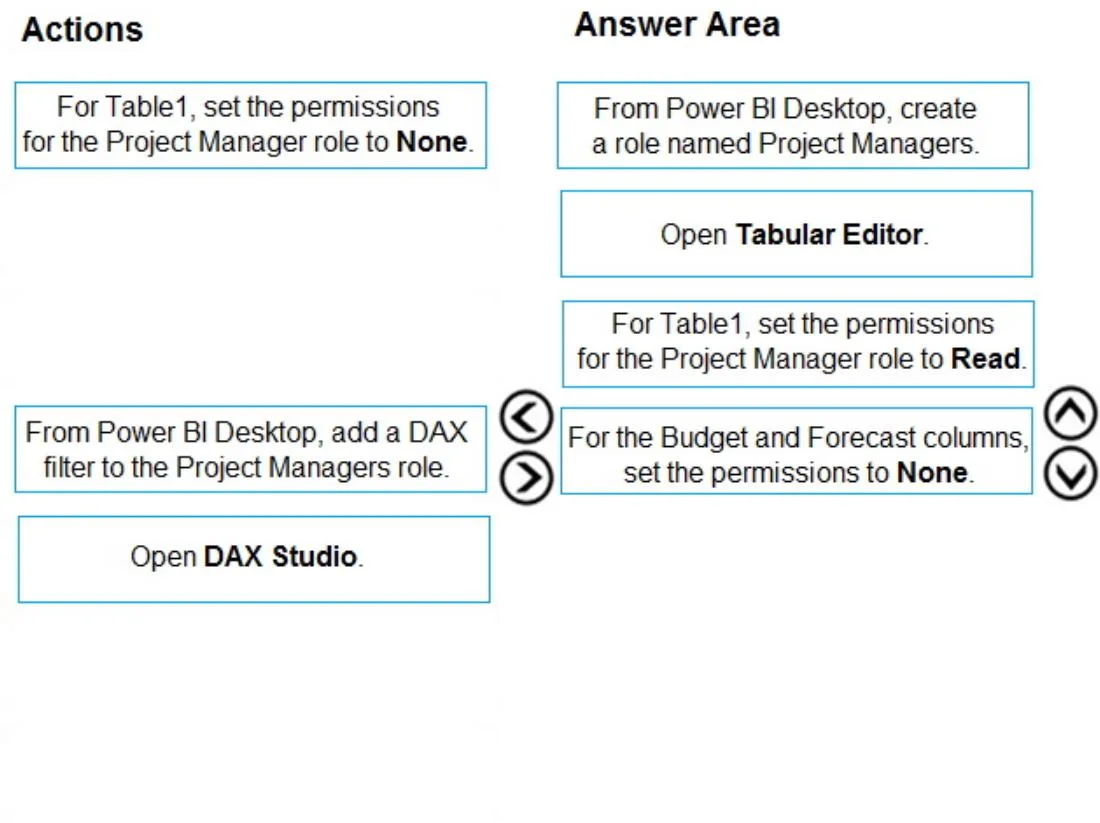
The provided exam question text regarding XMLA endpoint URL completion is mismatched with the exhibit images, which depict options for Power BI dataset security (RLS/OLS) and data aggregations. Assuming the underlying intent is to identify a tool for advanced dataset security configuration to enable XMLA connectivity for a guest user, 'Open Tabular Editor' is the most appropriate selection from the 'Answer Area'.
Approach. The exam question asks 'How should you complete the URL of the XMLA connection?' However, the options provided in the 'Answer Area' of the first image are not URL components. This indicates a significant mismatch between the explicit question text and the available answer choices.
Assuming the question implicitly asks for the necessary action or tool to ensure a guest user ([email protected] with a 'Contributor' workspace role) can connect to the XMLA endpoint of a dataset (DS1), we must consider the requirements for XMLA connectivity. A 'Contributor' role in a Power BI Premium workspace does not automatically grant 'Build' permission on datasets, which is crucial for querying via the XMLA endpoint.
Among the options in the 'Answer Area':
- 'Open Tabular Editor' is the most appropriate. Tabular Editor is an advanced external tool that allows direct manipulation of the Power BI dataset's underlying Tabular model metadata. This includes defining custom roles, managing permissions (such as 'Read', 'Process', and critically, 'Build' capabilities, although 'Build' is often managed at the dataset level in the service UI), and configuring detailed Row-Level Security (RLS) and Object-Level Security (OLS). If the guest user lacks the necessary 'Build' permission, or if complex security definitions are required to control their XMLA access, Tabular Editor provides the granular control needed to make such modifications to the dataset's security model. It is the most powerful tool listed for advanced model configuration relevant to XMLA interaction.
Common mistakes.
- common_mistake. Other options in the 'Answer Area' are incorrect because:
- 'From Power BI Desktop, create a role named Project Managers.': While creating RLS roles is part of security, this action alone does not grant the fundamental 'Build' permission required for a user to connect to the XMLA endpoint. It defines a role that would govern data access after a connection is established.
- 'For Table1, set the permissions for the Project Manager role to Read.': This defines a specific RLS rule (read access to a table for a role). This action focuses on data visibility after connection, not on enabling the connection itself for a user lacking 'Build' permission.
- 'For the Budget and Forecast columns, set the permissions to None.': This defines an OLS rule, restricting access to specific columns after connection. Again, this does not address the primary requirement of establishing an XMLA connection for a user who might lack 'Build' permission.
Common mistakes often involve confusing Row-Level Security (RLS) or Object-Level Security (OLS) definitions with the foundational 'Build' permission required for XMLA endpoint connectivity. Users might incorrectly assume that simply defining a role or permissions within the model automatically grants the ability to connect via XMLA, when in fact, the 'Build' permission on the dataset is a prerequisite that must be explicitly granted or inherited through a higher workspace role (like Admin or Member).
The options in the 'Actions' column (e.g., setting table permissions to None, adding DAX filters, opening DAX Studio) are either irrelevant to establishing the initial XMLA connection, or represent alternative security configurations or debugging tools rather than direct enablers of XMLA access for the described user.
Concept tested. The underlying technical concepts being tested (based on the most plausible interpretation of the mismatched question and images) are:
- Power BI XMLA Endpoint Connectivity Requirements: Understanding the necessary permissions (specifically 'Build' permission on a dataset) for a user, including guest users and those with 'Contributor' workspace roles, to connect to and query a Power BI dataset via its XMLA endpoint.
- Advanced Dataset Security Management: Knowledge of how to configure and manage Row-Level Security (RLS) and Object-Level Security (OLS) within Power BI datasets.
- External Tools for Power BI: Familiarity with advanced tools like Tabular Editor for directly editing Power BI dataset metadata, including security roles, partitions, and other model properties, which is often crucial for granular control over XMLA endpoint interactions.
Topics
Community Discussion
No community discussion yet for this question.