
DP-300 · Question #56
Hotspot Question You have SQL Server on an Azure virtual machine that contains a database named Db1. You need to enable automatic tuning for Db1. How should you complete the statements? To answer…
This question tests knowledge of how to enable automatic tuning on SQL Server running on an Azure Virtual Machine (IaaS), which requires T-SQL commands rather than Azure portal settings since the database is not an Azure SQL Database (PaaS).
Question
Exhibit
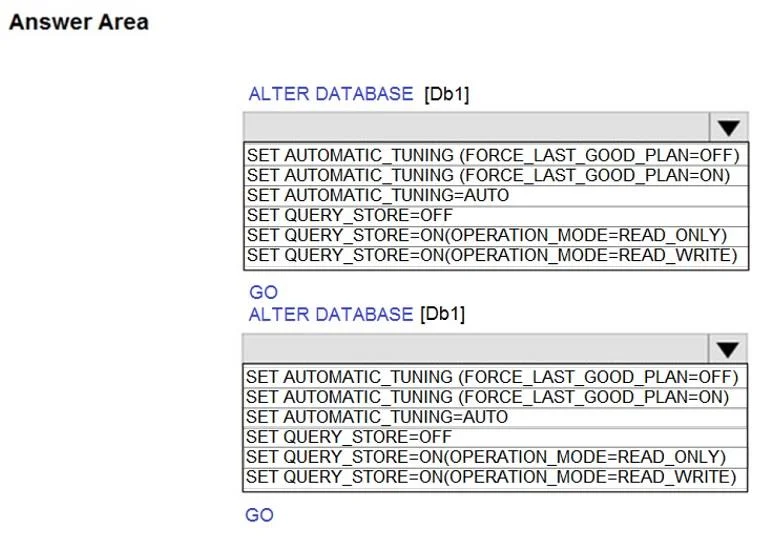
Answer Area
- ALTER DATABASE [Db1] (first statement)SET AUTOMATIC_TUNING (FORCE_LAST_GOOD_PLAN=OFF)SET AUTOMATIC_TUNING (FORCE_LAST_GOOD_PLAN=ON)SET AUTOMATIC_TUNING=AUTOSET QUERY_STORE=OFFSET QUERY_STORE=ON(OPERATION_MODE=READ_ONLY)SET QUERY_STORE=ON(OPERATION_MODE=READ_WRITE)
- ALTER DATABASE [Db1] (second statement)SET AUTOMATIC_TUNING (FORCE_LAST_GOOD_PLAN=OFF)SET AUTOMATIC_TUNING (FORCE_LAST_GOOD_PLAN=ON)SET AUTOMATIC_TUNING=AUTOSET QUERY_STORE=OFFSET QUERY_STORE=ON(OPERATION_MODE=READ_ONLY)SET QUERY_STORE=ON(OPERATION_MODE=READ_WRITE)
Explanation
This question tests knowledge of how to enable automatic tuning on SQL Server running on an Azure Virtual Machine (IaaS), which requires T-SQL commands rather than Azure portal settings since the database is not an Azure SQL Database (PaaS).
Approach. For SQL Server on an Azure VM (IaaS), automatic tuning is configured using T-SQL ALTER DATABASE statements, not through the Azure portal's automatic tuning blade (which is only available for Azure SQL Database PaaS). The correct approach is to first enable automatic tuning at the database level using: ALTER DATABASE [Db1] SET AUTOMATIC_TUNING = AUTO; and then enable specific tuning options such as FORCE_LAST_GOOD_PLAN, CREATE_INDEX, and DROP_INDEX using: ALTER DATABASE [Db1] SET AUTOMATIC_TUNING (FORCE_LAST_GOOD_PLAN = ON, CREATE_INDEX = ON, DROP_INDEX = ON). You must use T-SQL because Azure portal automatic tuning settings apply only to Azure SQL Database (PaaS), not to SQL Server on Azure VMs (IaaS).
Concept tested. Configuring automatic tuning for SQL Server on Azure Virtual Machines (IaaS) using T-SQL ALTER DATABASE statements, and distinguishing between IaaS (SQL Server on VM) and PaaS (Azure SQL Database) management approaches.
Reference. https://docs.microsoft.com/en-us/sql/relational-databases/automatic-tuning/automatic-tuning
Topics
Community Discussion
No community discussion yet for this question.