
DP-300 · Question #467
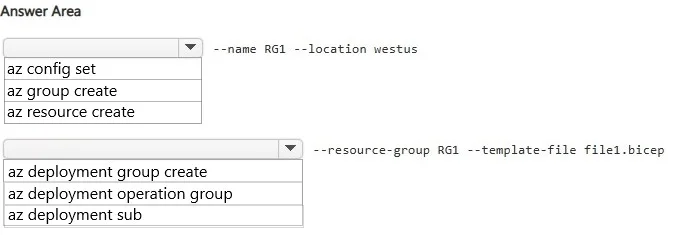
Hotspot Question You have an Azure subscription. You have a Bicep file named File1.bicep that deploys an Azure SQL database. You need to perform the following actions: - Create a new resource group…
This question tests knowledge of Azure CLI commands for creating a resource group and deploying a Bicep file to a specific resource group scope.
Question
Exhibit
Answer Area
- --name RG1 --location westusaz config setaz group createaz resource create
- --resource-group RG1 --template-file file1.bicepaz deployment group createaz deployment operation groupaz deployment sub
Explanation
This question tests knowledge of Azure CLI commands for creating a resource group and deploying a Bicep file to a specific resource group scope.
Approach. To create a new resource group, you use 'az group create --name RG1 --location <location>'. To deploy a Bicep file to that resource group, you use 'az deployment group create --resource-group RG1 --template-file File1.bicep'. The 'az deployment group create' command is specifically used for resource-group-scoped deployments, while 'az deployment sub create' would be for subscription-scoped deployments. The '--template-file' parameter specifies the Bicep file to use for the deployment, and '--resource-group' targets the newly created RG1.
Concept tested. Azure CLI commands for resource group creation (az group create) and Bicep/ARM template deployment at resource group scope (az deployment group create --resource-group --template-file). Key distinction is knowing the correct deployment scope command: 'deployment group' for resource group scope vs 'deployment sub' for subscription scope.
Topics
Community Discussion
No community discussion yet for this question.