
DP-300 · Question #448
Hotspot Question You have two Azure SQL databases named SQLDB1 and SQLDB2 in the Hyperscale service tier. SQLDB1 was set to the Hyperscale service tier when the database was created. SQLDB2 was…
To change Azure SQL databases from Hyperscale to Business Critical, a database initially created in Hyperscale requires data export, while one recently converted from Business Critical to Hyperscale within 14 days can be directly reverted.
Question
Exhibit
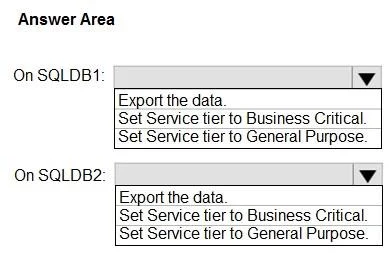
Answer Area
- On SQLDB1:Export the data.Set Service tier to Business Critical.Set Service tier to General Purpose.
- On SQLDB2:Export the data.Set Service tier to Business Critical.Set Service tier to General Purpose.
Explanation
To change Azure SQL databases from Hyperscale to Business Critical, a database initially created in Hyperscale requires data export, while one recently converted from Business Critical to Hyperscale within 14 days can be directly reverted.
Approach. The core of this problem lies in understanding the limitations and capabilities of changing Azure SQL Database service tiers, specifically concerning the Hyperscale tier.
For SQLDB1: The question states, 'SQLDB1 was set to the Hyperscale service tier when the database was created.' When a database is created directly in the Hyperscale tier, it utilizes a fundamentally different architecture from the General Purpose or Business Critical tiers. As a result, there is no direct path to convert it back to these non-Hyperscale tiers. The only method to move a database created in Hyperscale to another tier (like Business Critical) is to perform a logical migration. This involves exporting the data to a BACPAC file, creating a new database in the desired Business Critical tier, and then importing the data into the new database. Therefore, the first step for SQLDB1 is to 'Export the data.'
For SQLDB2: The question states, 'SQLDB2 was changed from the Business Critical service tier to the Hyperscale service tier during the last 14 days.' Azure provides a specific grace period (typically 14 days) during which a database that was converted to Hyperscale from another vCore service tier (like Business Critical) can be reverted to its original tier directly, without needing to export and import data. This is because Azure retains a snapshot or metadata from the original tier for a limited time. Since SQLDB2 was previously in Business Critical and was converted to Hyperscale within the 14-day window, it can be directly reverted to Business Critical. Therefore, for SQLDB2, you should 'Set Service tier to Business Critical.'
The solution 'minimize administrative effort' aligns with these choices, as direct tier change is less effort than export/import.
Common mistakes.
- common_mistake. 1. Attempting to 'Set Service tier to Business Critical' directly for SQLDB1: This is incorrect because databases created in Hyperscale cannot be directly converted to other service tiers like Business Critical. The architectural differences prevent a simple tier change. This would fail in the Azure portal or via PowerShell/CLI.
- Attempting to 'Export the data' for SQLDB2: While technically possible, this is not the most efficient or administratively minimized approach for SQLDB2. The question specifically asks to minimize administrative effort. Given the 14-day revert window, directly setting the service tier back to Business Critical is much simpler and faster than performing an export/import operation.
- Selecting 'Set Service tier to General Purpose' for either database: This is incorrect because the requirement explicitly states the target service tier is 'Business Critical', not General Purpose.
Concept tested. Azure SQL Database service tiers, specifically the Hyperscale tier's architecture, its limitations regarding direct tier changes, and the specific 14-day revert window for databases converted to Hyperscale from other vCore tiers.
Topics
Community Discussion
No community discussion yet for this question.