
DP-300 · Question #442
Drag and Drop Question You have an on-premises server named Server1 that has Microsoft SQL Server 2022 installed. You have an Azure subscription that contains an Azure SQL managed instance named…
The correct answer is Create a credential on MI1.; Back up DB2 to a URL and use the COPY_ONLY option.; Restore DB2 from the URL and use the WITH MOVE option. Explanation: Copying Azure SQL Managed Instance DB to On-Premises SQL Server The Core Problem You need to move a database from Azure SQL Managed Instance (MI1) -> to on-premises SQL Server 2022 (Server1). The key constraint is that Azure SQL Managed Instance cannot back up to a…
Question
Exhibit
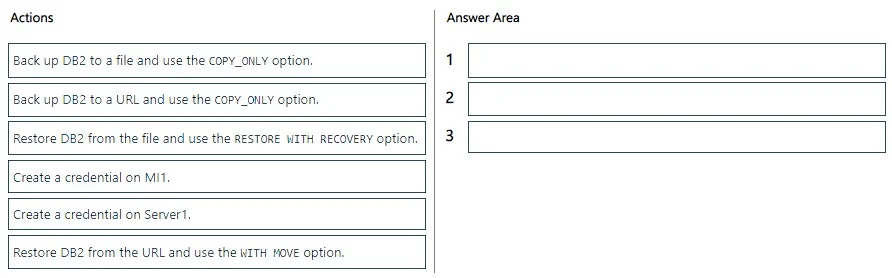
Answer Area
Drag items
Correct arrangement
- Create a credential on MI1.
- Back up DB2 to a URL and use the COPY_ONLY option.
- Restore DB2 from the URL and use the WITH MOVE option.
Explanation
Explanation: Copying Azure SQL Managed Instance DB to On-Premises SQL Server
The Core Problem
You need to move a database from Azure SQL Managed Instance (MI1) -> to on-premises SQL Server 2022 (Server1). The key constraint is that Azure SQL Managed Instance cannot back up to a local file path - it can only back up to Azure Blob Storage (a URL).
Step-by-Step Breakdown
Step 1: Create a credential on MI1
The credential must be created on MI1 first, before any backup operation. This is a SAS (Shared Access Signature) credential that grants MI1 permission to write to an Azure Blob Storage container. Without it, MI1 has no authentication context to reach Azure Blob Storage and the backup command will fail immediately.
Common mistake: Creating the credential on Server1 first. Server1 needs a credential too - but only for the restore phase, and the question's correct answer skips that step, implying Server1 can access the URL directly or that the credential on MI1 is sufficient for this flow. The exam focuses on the MI1 credential as the prerequisite for the backup.
Step 2: Back up DB2 to a URL using COPY_ONLY
Once MI1 has credentials to write to Blob Storage, you run the backup. Two important points:
- To a URL (not a file): MI1 has no local filesystem access -
BACKUP TO DISKis not supported. The backup must go to Azure Blob Storage viaBACKUP TO URL. - COPY_ONLY: This creates a standalone backup that does not break the log chain on MI1. It's the correct flag when you're copying a database without intending to affect the source's backup strategy.
Common mistake: Choosing "Back up to a file." MI1 simply cannot do this - it's a PaaS service with no local disk access.
Step 3: Restore DB2 from the URL using WITH MOVE
Server1 restores directly from the Azure Blob Storage URL. Key points:
- FROM URL (not from file): The backup lives in Blob Storage, not on Server1's local disk.
- WITH MOVE: This is required when the file paths in the backup (MI1's internal data/log file locations) don't match the target server's directory structure. Since MI1 is a managed cloud service, its internal paths will almost certainly differ from Server1's local paths, making
WITH MOVEnecessary to specify new local file locations. - Not WITH RECOVERY?
RESTORE WITH RECOVERYbrings the database online and finalizes it - which sounds right. However, the correct answer specifiesWITH MOVE(which is compatible with recovery). The exam distinguishes this becauseWITH MOVEis the required option here;WITH RECOVERYis the default behavior unless you're doing a multi-step restore.
Common mistake: Choosing "Restore from the file" - there is no local file. The backup went to Blob Storage, so the restore must also come from a URL. Also confusing
WITH MOVEvsWITH RECOVERY- you needWITH MOVEspecifically because file paths differ between MI and on-premises.
Why the Other Items Are Wrong
| Item | Why Excluded |
|---|---|
| Back up to a file (COPY_ONLY) | MI1 cannot write to local disk |
| Restore from file (WITH RECOVERY) | No local file exists; wrong source |
| Create credential on Server1 | Server1 may need one too in practice, but MI1's credential is the critical prerequisite the exam tests |
Mental Model
Think of Azure Blob Storage as the transfer intermediary: MI1 writes to it (needs credential) -> Server1 reads from it (needs correct restore syntax). The flow is always MI1 -> Blob Storage -> Server1, never direct.
Topics
Community Discussion
No community discussion yet for this question.