
DP-300 · Question #440
Hotspot Question You have an on-premises Microsoft SQL Server instance named SQLSVR1 that hosts a database named DB1. You have an Azure subscription that contains an Azure SQL database named SQLDB1…
Dropdown 1: Configure SQLDB1 -> As a push subscriber only Why this is correct: Azure SQL Database has no SQL Server Agent. Pull subscriptions require the subscriber to run a Distribution Agent job via SQL Agent to periodically fetch changes from the distributor. Since Azure SQL…
Question
Exhibit
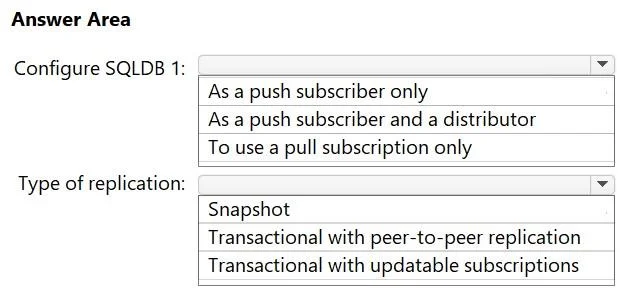
Answer Area
- Configure SQLDB 1:As a push subscriber onlyAs a push subscriber and a distributorTo use a pull subscription only
- Type of replication:SnapshotTransactional with peer-to-peer replicationTransactional with updatable subscriptions
Explanation
Dropdown 1: Configure SQLDB1 -> As a push subscriber only
Why this is correct: Azure SQL Database has no SQL Server Agent. Pull subscriptions require the subscriber to run a Distribution Agent job via SQL Agent to periodically fetch changes from the distributor. Since Azure SQL DB cannot run SQL Agent jobs, it cannot initiate pull subscriptions. The distributor must push changes to it.
Additionally, Azure SQL DB cannot act as a distributor itself - it has no access to distribution database infrastructure.
Why the others are wrong:
- As a push subscriber and a distributor - Azure SQL DB cannot serve as a distributor. The distributor must be on-premises (or a separate Azure VM).
- To use a pull subscription only - Ruled out because pull subscriptions require SQL Agent on the subscriber side, which Azure SQL DB doesn't have.
Dropdown 2: Type of replication -> Transactional with updatable subscriptions
Why this is correct: The key constraint is minimizing performance impact on DB1 (the publisher). Transactional replication reads incrementally from the transaction log rather than locking tables and scanning all data. This is far less intrusive to the publisher than snapshot replication. Among the transactional options, "updatable subscriptions" is the only one technically compatible with Azure SQL DB as a subscriber.
Why the others are wrong:
- Snapshot - Generates a full point-in-time copy of all data, causing table locks and heavy I/O on DB1. This maximizes performance impact, not minimizes it.
- Transactional with peer-to-peer replication - Peer-to-peer requires every node to act as both publisher and subscriber. Azure SQL Database cannot be a publisher, so this topology is unsupported here.
Core concept: In SQL Server replication to Azure SQL DB, the architecture is always:
DB1 (Publisher) -> Distributor (on-prem) -> SQLDB1 (Push Subscriber only)
Transactional replication via the log reader is the standard low-impact migration path for live databases.
Topics
Community Discussion
No community discussion yet for this question.