
DP-300 · Question #410
SIMULATION You need to capture the following information for all the databases on sq12345678: - Queries to the databases - Users that executed the queries The captured information must be stored in…
SQL Server Extended Events - Exam Simulation Explanation --- Overall Goal You need audit-level visibility into an Azure SQL Server (sq12345678): specifically what queries ran and who ran them. The captured data must persist to an Azure Storage Account (sa12345678). Why Extended…
Question
Exhibit
Explanation
SQL Server Extended Events - Exam Simulation Explanation
Overall Goal
You need audit-level visibility into an Azure SQL Server (sq12345678): specifically what queries ran and who ran them. The captured data must persist to an Azure Storage Account (sa12345678).
Why Extended Events (XEvents)? It's SQL Server's built-in, low-overhead event tracing framework - the successor to SQL Profiler. It's the correct tool here because:
- It works on Azure SQL (Profiler does not)
- It can write directly to Azure Blob Storage
- It has minimal performance impact on the target server
Step-by-Step Reasoning
Step 1 - Open SSMS SSMS is the GUI tool for managing SQL Server. You need it because the Azure portal doesn't expose Extended Events session configuration for Azure SQL at this level of detail.
Skip consequence: You'd have no way to configure XEvents via GUI.
Step 2 - Locate sq12345678 in Object Explorer
You must be connected to the right server before creating a session. XEvent sessions are server-scoped - they run on and capture from that specific SQL Server instance.
Skip consequence: You might create the session on the wrong server and capture nothing from the target databases.
Step 3 - Create a New Event Session
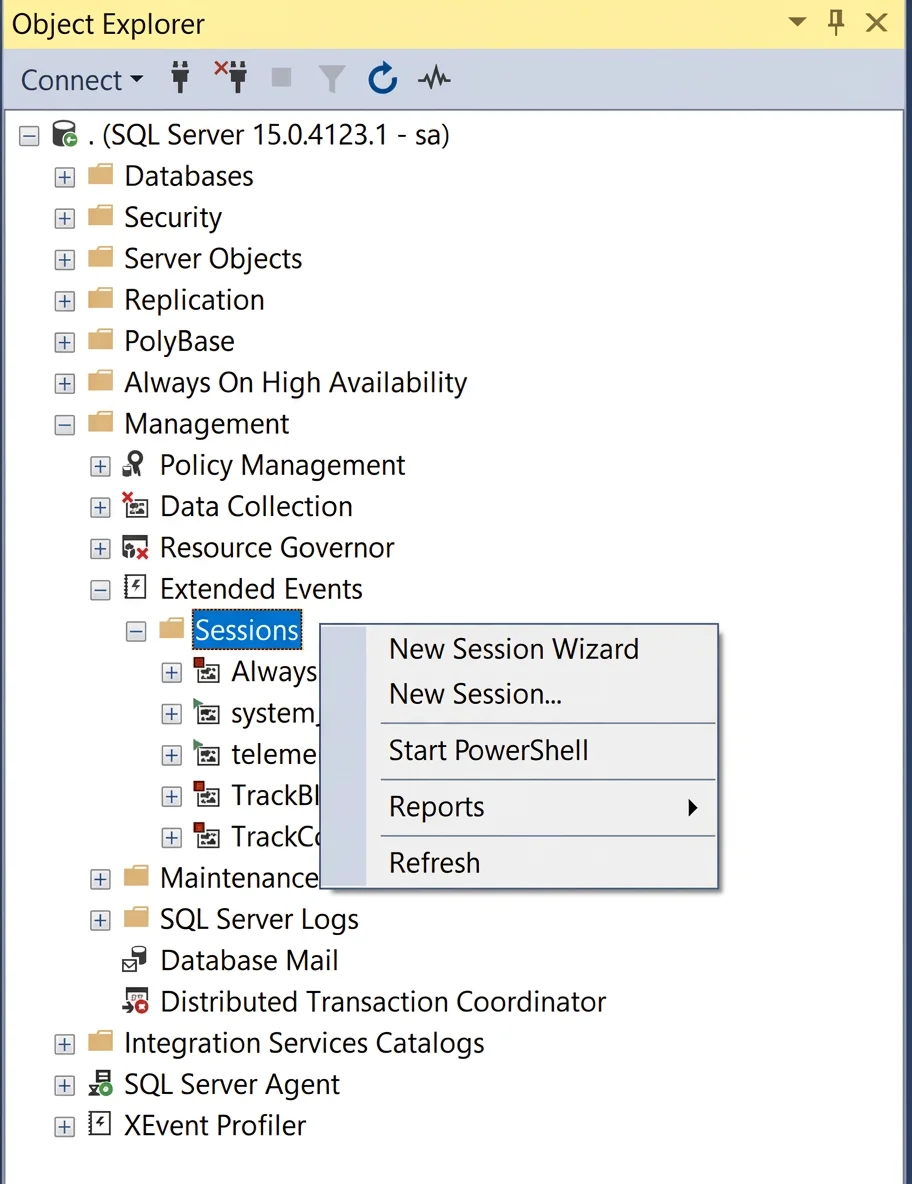
Navigate to Management > Extended Events > Sessions > New Session. This is the container that holds your event definitions, actions, and output targets.
Skip consequence: Without a session, there's nothing to configure or start - no events will be captured at all.
Step 4 - Define Events
| Event | Purpose |
|---|---|
sql_statement_completed | Fires when any SQL statement finishes executing - captures the query text, duration, database context |
sql_server_login | Fires on each login - captures who connected, from where |
Why both? sql_statement_completed tells you what ran; sql_server_login tells you who authenticated. Together they satisfy both requirements (queries + users).
Skip consequence: Using only sql_statement_completed gives you queries but may not reliably identify users across all scenarios. Omitting sql_server_login means you miss login-time identity capture.
Step 5 - Add Actions
Actions are additional data fields collected at the moment the event fires. Events alone only capture their default payload.
For sql_statement_completed:
collect_statement_text- the actual SQL querycollect_principal_name/collect_login_name- who ran itcollect_database_id- which databasecollect_system_time- when it happenedcollect_application_name- which app sent the query
For sql_server_login:
collect_principal_name/collect_login_name- identitycollect_session_id- correlate to subsequent statementscollect_client_hostname- source machine
Skip consequence: Without actions, you get bare event records with minimal fields. You'd know a statement completed but not what it was or who ran it - defeating the entire purpose.
Step 6 - Set Target to event_file pointing at sa12345678
The target is where captured events are written. event_file writes to a .xel file in Azure Blob Storage. Selecting sa12345678 via the browse button points the output to the correct storage account.
Skip consequence: Events captured in memory only (ring buffer) are lost when the session stops or the server restarts. Without persistent storage, you have no durable audit trail - and the question explicitly requires storage in sa12345678.
Out-of-order consequence: You must define events/actions before configuring the target - the session won't be valid without events.
Step 7 - Start the Event Session
Once configured, start the session so it begins actively capturing. Optionally set filters (e.g., duration > 1000ms) to reduce noise, but for this task capturing everything is appropriate.
Skip consequence: A configured but not-started session captures nothing.
Memory Tip
Use the acronym ECLAST:
Event session -> Choose events -> Layer actions -> Assign storage target -> Start session -> Test output
Think of it like setting up a security camera:
- Events = what the camera watches for
- Actions = what metadata the camera stamps on each frame
- Target = where the video is saved
- Start = press record
Topics
Community Discussion
No community discussion yet for this question.