
DP-300 · Question #287
Hotspot Question You have an Azure SQL database named DB1 in the General Purpose service tier. You need to monitor DB1 by using SQL Insights. What should you include in the solution? To answer…
This question tests knowledge of the components required to set up SQL Insights monitoring for an Azure SQL Database in the General Purpose service tier.
Question
Exhibit
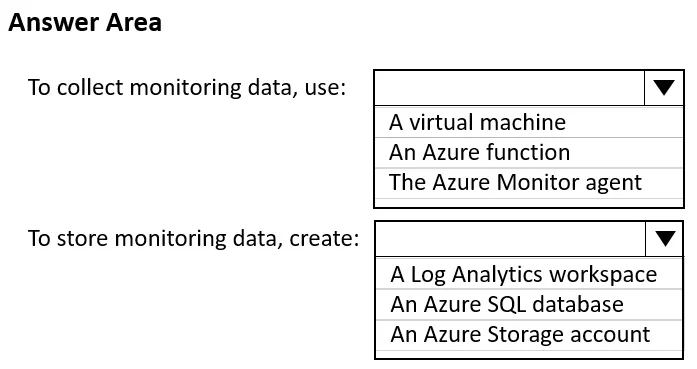
Answer Area
- To collect monitoring data, use:A virtual machineAn Azure functionThe Azure Monitor agent
- To store monitoring data, create:A Log Analytics workspaceAn Azure SQL databaseAn Azure Storage account
Explanation
This question tests knowledge of the components required to set up SQL Insights monitoring for an Azure SQL Database in the General Purpose service tier.
Approach. To use SQL Insights for monitoring an Azure SQL Database, you need: (1) An Azure Monitor workspace (Log Analytics workspace) to store the monitoring data collected by SQL Insights. (2) A monitoring virtual machine (VM) running the Azure Monitor Agent, which acts as the collection agent that connects to the SQL database and gathers performance data - SQL Insights uses a remote collection model where a separate VM queries the database via DMVs and sends data to the Log Analytics workspace. (3) A monitoring profile configured in SQL Insights that defines the connection string, credentials, and collection frequency for DB1. The General Purpose tier supports SQL Insights since it exposes the necessary dynamic management views (DMVs) used for data collection.
Concept tested. SQL Insights monitoring architecture for Azure SQL Database - specifically understanding that SQL Insights requires a Log Analytics workspace, a monitoring VM running Azure Monitor Agent (remote collection model), and a properly configured monitoring profile, as opposed to other monitoring approaches like built-in Query Performance Insight or Azure Diagnostics settings.
Reference. https://learn.microsoft.com/en-us/azure/azure-monitor/insights/sql-insights-overview
Topics
Community Discussion
No community discussion yet for this question.