
DP-300 · Question #144
Hotspot Question You have an Azure Data Factory instance named ADF1 and two Azure Synapse Analytics workspaces named WS1 and WS2. ADF1 contains the following pipelines: - P1:Uses a copy activity to…
This question tests knowledge of Azure Data Factory copy activity dataset settings that maximize parallelism when reading from and writing to Azure Synapse Analytics dedicated SQL pools.
Question
Exhibit
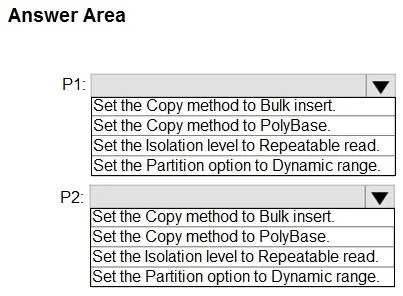
Answer Area
- P1:Set the Copy method to Bulk insert.Set the Copy method to PolyBase.Set the Isolation level to Repeatable read.Set the Partition option to Dynamic range.
- P2:Set the Copy method to Bulk insert.Set the Copy method to PolyBase.Set the Isolation level to Repeatable read.Set the Partition option to Dynamic range.
Explanation
This question tests knowledge of Azure Data Factory copy activity dataset settings that maximize parallelism when reading from and writing to Azure Synapse Analytics dedicated SQL pools.
Approach. For P1 (copying FROM a dedicated SQL pool / nonpartitioned table to ADLS Gen2), you should enable 'Partition option' on the SOURCE dataset and set it to 'Physical partitions of table' or use 'Dynamic range' partitioning - the correct setting is to configure the source with a partition option such as 'Physical partitions of table' to allow parallel reads. For P2 (copying FROM ADLS Gen2 text-delimited files TO a dedicated SQL pool / nonpartitioned table), you should configure the SINK (destination) dataset to use 'Copy method: PolyBase' or 'COPY statement' and enable staging, which allows bulk parallel loading into the dedicated SQL pool. Specifically for P1 source: set Partition option to 'Physical partitions of table' to maximize read parallelism from the SQL pool. For P2 sink: set the Copy method to 'Copy command' (COPY INTO statement) which enables the highest throughput parallel ingestion into Synapse dedicated SQL pools.
Concept tested. Azure Data Factory copy activity performance optimization - specifically configuring partition options on source datasets when reading from Synapse dedicated SQL pools (to enable parallel reads), and configuring the appropriate bulk load copy method (PolyBase or COPY command) on sink datasets when writing to Synapse dedicated SQL pools (to enable parallel writes and maximize throughput).
Reference. https://learn.microsoft.com/en-us/azure/data-factory/connector-azure-sql-data-warehouse#parallel-copy-from-azure-synapse-analytics and https://learn.microsoft.com/en-us/azure/data-factory/connector-azure-sql-data-warehouse#use-copy-statement
Topics
Community Discussion
No community discussion yet for this question.