
DP-300 · Question #141
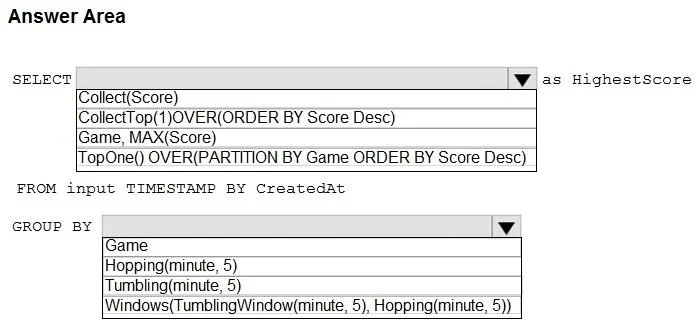
Hotspot Question You are building an Azure Stream Analytics job to retrieve game data. You need to ensure that the job returns the highest scoring record for each five-minute time interval of each…
The correct answer is SELECT: TopOne() OVER(PARTITION BY Game ORDER BY Score Desc); GROUP BY: Tumbling(minute, 5). This question tests knowledge of Azure Stream Analytics windowing functions and aggregation to find the highest scoring record per game within fixed five-minute intervals.
Question
Exhibit
Answer Area
- SELECTTopOne() OVER(PARTITION BY Game ORDER BY Score Desc)Collect(Score)CollectTop(1)OVER(ORDER BY Score Desc)Game, MAX(Score)TopOne() OVER(PARTITION BY Game ORDER BY Score Desc)
- GROUP BYTumbling(minute, 5)GameHopping(minute, 5)Tumbling(minute, 5)Windows(TumblingWindow(minute, 5), Hopping(minute, 5))
Explanation
This question tests knowledge of Azure Stream Analytics windowing functions and aggregation to find the highest scoring record per game within fixed five-minute intervals.
Approach. The correct query uses a TUMBLING WINDOW of 5 minutes (TUMBLING WINDOW(minute, 5)) to define fixed, non-overlapping time intervals. To retrieve the highest score per game per window, you use MAX(score) along with GROUP BY Game, TumblingWindow(minute, 5). The full structure would be: SELECT Game, MAX(Score) AS Score, System.Timestamp() AS WindowEnd FROM [input] GROUP BY Game, TumblingWindow(minute, 5). Tumbling windows are the correct choice here because they partition time into distinct, equal-sized, non-overlapping segments - perfect for 'each five-minute interval' requirements.
Concept tested. Azure Stream Analytics windowing functions - specifically Tumbling Windows for fixed-interval aggregation combined with MAX() aggregation function and GROUP BY to partition results by game and time window.
Reference. https://docs.microsoft.com/en-us/azure/stream-analytics/stream-analytics-window-functions
Topics
Community Discussion
No community discussion yet for this question.