
DP-203 · Question #61
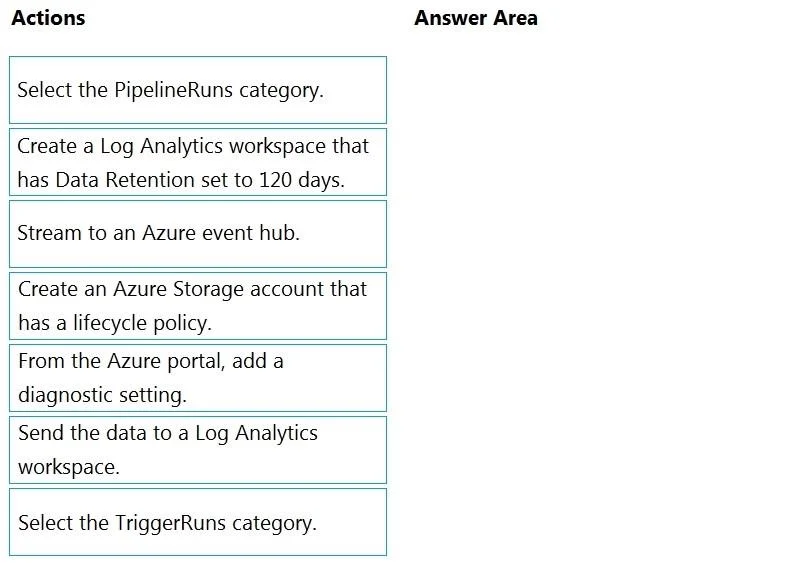
Drag and Drop Question You have an Azure data factory. You need to ensure that pipeline-run data is retained for 120 days. The solution must ensure that you can query the data by using the Kusto…
The correct answer is Create a Log Analytics workspace that has Data Retention set to 120 days.; From the Azure portal, add a diagnostic setting.; Select the PipelineRuns category.; Send the data to a Log Analytics workspace. To retain pipeline-run data for 120 days and enable Kusto Query Language (KQL) queries, you must first create a Log Analytics workspace with retention set to 120 days (since Log Analytics supports KQL natively). Then, add a diagnostic setting in Azure Data Factory via the Azure…
Question
Exhibit
Answer Area
Drag items
Correct arrangement
- Create a Log Analytics workspace that has Data Retention set to 120 days.
- From the Azure portal, add a diagnostic setting.
- Select the PipelineRuns category.
- Send the data to a Log Analytics workspace.
Explanation
To retain pipeline-run data for 120 days and enable Kusto Query Language (KQL) queries, you must first create a Log Analytics workspace with retention set to 120 days (since Log Analytics supports KQL natively). Then, add a diagnostic setting in Azure Data Factory via the Azure portal, select the PipelineRuns category to capture the relevant pipeline data, and configure the diagnostic setting to send data to the Log Analytics workspace. This combination ensures the data is stored with the correct retention period and is queryable via KQL.
Topics
Community Discussion
No community discussion yet for this question.