
DP-203 · Question #56
Drag and Drop Question You have an Azure Stream Analytics job that is a Stream Analytics project solution in Microsoft Visual Studio. The job accepts data generated by IoT devices in the JSON…
The correct answer is Add an Azure Stream Analytics Custom Deserializer Project (.NET) project to the solution.; Add .NET deserializer code for Protobuf to the custom deserializer project.; Change the Event Serialization format to Protobuf in the input.json file of the job and reference the DLL. To support Protobuf deserialization in Azure Stream Analytics from Visual Studio, you must first add a Custom Deserializer Project (.NET) to the solution, which provides the framework for custom format handling. Next, you add the .NET deserializer code for Protobuf to that…
Question
Exhibit
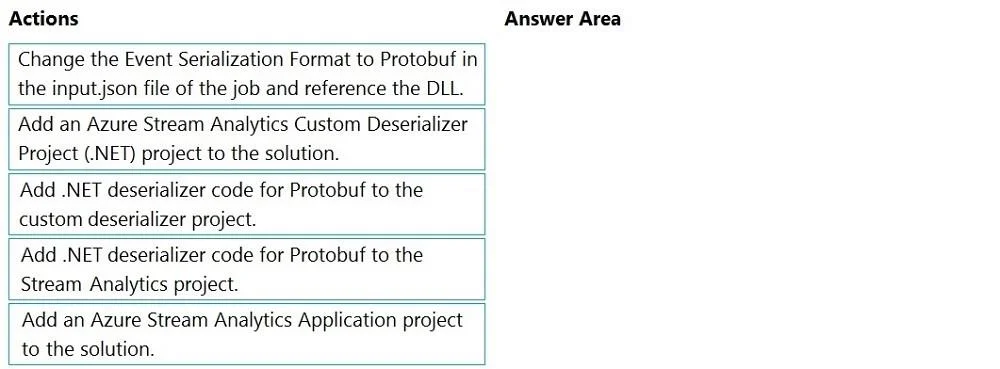
Answer Area
Drag items
Correct arrangement
- Add an Azure Stream Analytics Custom Deserializer Project (.NET) project to the solution.
- Add .NET deserializer code for Protobuf to the custom deserializer project.
- Change the Event Serialization format to Protobuf in the input.json file of the job and reference the DLL.
Explanation
To support Protobuf deserialization in Azure Stream Analytics from Visual Studio, you must first add a Custom Deserializer Project (.NET) to the solution, which provides the framework for custom format handling. Next, you add the .NET deserializer code for Protobuf to that custom deserializer project (not the Stream Analytics project itself). Finally, you update the input.json file in the Stream Analytics project to reference the Protobuf serialization format and point to the compiled DLL from the deserializer project. This three-step sequence is the prescribed Visual Studio workflow for extending Stream Analytics with custom deserialization formats.
Topics
Community Discussion
No community discussion yet for this question.