
DP-203 · Question #62
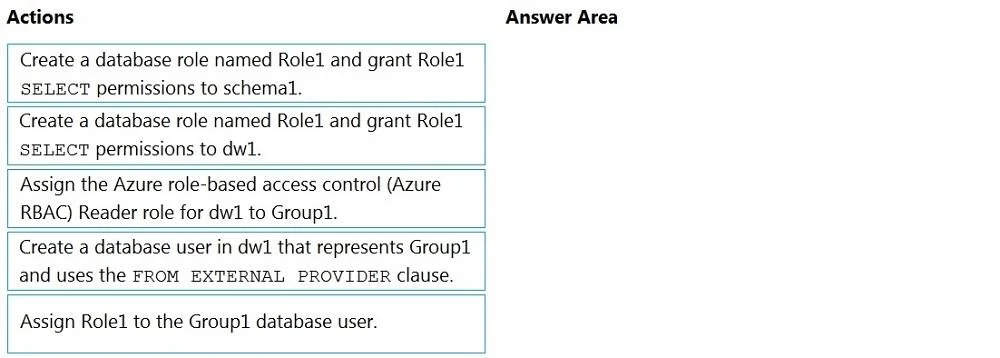
Drag and Drop Question You have an Azure Active Directory (Azure AD) tenant that contains a security group named Group1. You have an Azure Synapse Analytics dedicated SQL pool named dw1 that…
The correct answer is Create a database user in dw1 that represents Group1 and uses the FROM EXTERNAL PROVIDER clause.; Create a database role named Role1 and grant Role1 SELECT permissions to schema1.; Assign Role1 to the Group1 database user. To grant an Azure AD group access to a Synapse dedicated SQL pool using least privilege, you must first create a contained database user mapped to the Azure AD group using FROM EXTERNAL PROVIDER (this links the external identity to the database). Next, create a database role…
Question
Exhibit
Answer Area
Drag items
Correct arrangement
- Create a database user in dw1 that represents Group1 and uses the FROM EXTERNAL PROVIDER clause.
- Create a database role named Role1 and grant Role1 SELECT permissions to schema1.
- Assign Role1 to the Group1 database user.
Explanation
To grant an Azure AD group access to a Synapse dedicated SQL pool using least privilege, you must first create a contained database user mapped to the Azure AD group using FROM EXTERNAL PROVIDER (this links the external identity to the database). Next, create a database role (Role1) and grant it SELECT permissions scoped specifically to schema1 (not the entire database, which would violate least privilege). Finally, assign Role1 to the Group1 database user so the permissions flow through the role. This three-step pattern - create user, create scoped role, assign role - is the standard least-privilege approach for Azure Synapse SQL pools.
Topics
Community Discussion
No community discussion yet for this question.