
DP-100 · Question #57
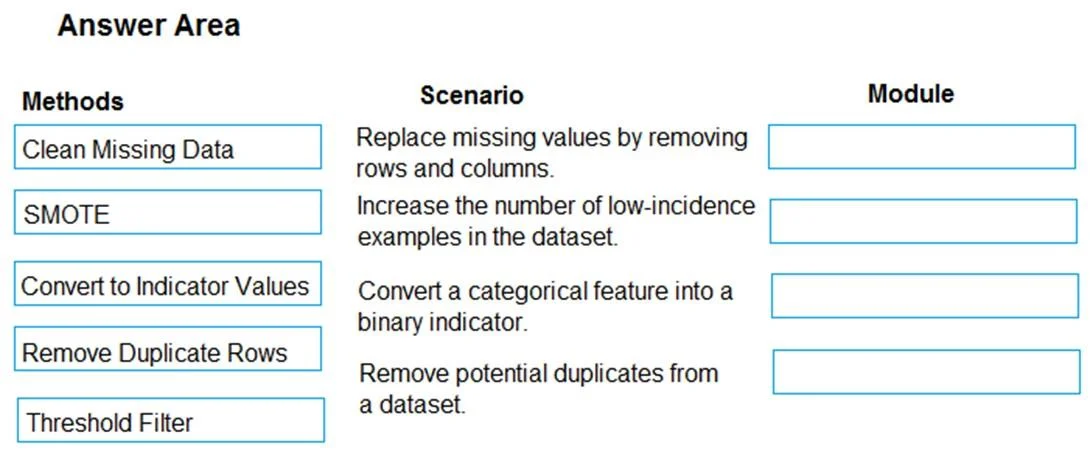
Drag and Drop Question You are analyzing a raw dataset that requires cleaning. You must perform transformations and manipulations by using Azure Machine Learning Studio. You need to identify the…
The correct answer is Clean Missing Data; SMOTE; Convert to Indicator Values; Remove Duplicate Rows. This question tests knowledge of common data transformation and cleaning modules in Azure Machine Learning Studio, requiring test-takers to match specific data manipulation tasks to the correct module.
Question
Exhibit
Answer Area
Drag items
Correct arrangement
- Clean Missing Data
- SMOTE
- Convert to Indicator Values
- Remove Duplicate Rows
Explanation
This question tests knowledge of common data transformation and cleaning modules in Azure Machine Learning Studio, requiring test-takers to match specific data manipulation tasks to the correct module.
Approach. The correct interaction involves dragging the appropriate module from the 'Methods' column to the 'Module' box next to its corresponding 'Scenario'.
- Scenario 1: 'Replace missing values by removing rows and columns.' The module 'Clean Missing Data' is specifically designed to handle missing values, offering options to remove rows or columns, or to replace missing values using various imputation methods.
- Scenario 2: 'Increase the number of low-incidence examples in the dataset.' The module 'SMOTE' (Synthetic Minority Over-sampling Technique) is a widely used algorithm to address imbalanced datasets by generating synthetic samples for the minority class, thus increasing its representation.
- Scenario 3: 'Convert a categorical feature into a binary indicator.' The module 'Convert to Indicator Values' transforms categorical columns into a series of binary (0 or 1) columns, where each new column represents a unique category and indicates its presence or absence, which is precisely what 'binary indicator' refers to.
- Scenario 4: 'Remove potential duplicates from a dataset.' The module 'Remove Duplicate Rows' directly performs the task of identifying and eliminating duplicate rows within a dataset based on specified criteria.
Common mistakes.
- common_mistake. A common mistake would be to confuse the purpose of 'Threshold Filter' with other cleaning or transformation tasks. 'Threshold Filter' is used to filter rows based on a specified numerical threshold for a column, which does not match any of the provided scenarios for missing data, imbalanced data, categorical conversion, or duplicate removal. For example, using 'Threshold Filter' for 'Remove potential duplicates' would be incorrect because it's not designed for identifying identical rows across multiple columns. Another mistake could be incorrectly associating SMOTE with general data cleaning instead of its specific use for handling class imbalance, or misidentifying 'Convert to Indicator Values' with other data type conversions.
Concept tested. The core concept being tested is data preprocessing and feature engineering within machine learning, specifically focusing on common data cleaning, transformation, and sampling techniques used to prepare raw datasets for model training in Azure Machine Learning Studio.
Topics
Community Discussion
No community discussion yet for this question.