
DP-100 · Question #563
Drag and Drop Question You have an Azure AI Foundry project named Project1. You are developing a web classification Prompt flow named Flow1 in Project1. The current input of Flow1 is defined as the…
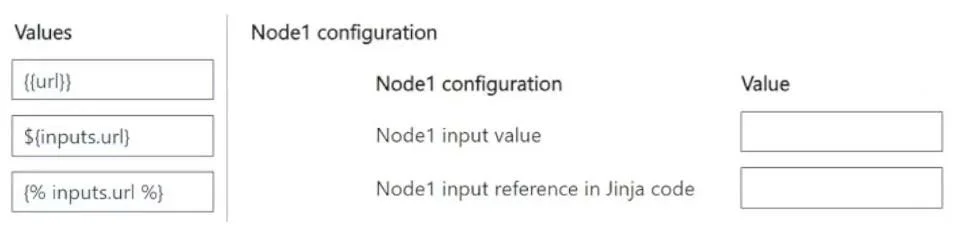
The correct answer is ${inputs.url}; {{url}}. This question tests the understanding of Prompt Flow input referencing in Azure AI Foundry, specifically distinguishing between assigning flow inputs to node inputs and referencing node inputs within Jinja code.
Question
Exhibit
Answer Area
Drag items
Correct arrangement
- ${inputs.url}
- {{url}}
Explanation
This question tests the understanding of Prompt Flow input referencing in Azure AI Foundry, specifically distinguishing between assigning flow inputs to node inputs and referencing node inputs within Jinja code.
Approach. To correctly configure Node1: 1. For 'Node1 input value', drag and drop ${inputs.url}. This is because Node1's input url needs to receive its value from the overall Flow1's input url. In Prompt Flow, the syntax ${inputs.<input_name>} is used to reference a parent flow's input when assigning it to a node's input. 2. For 'Node1 input reference in Jinja code', drag and drop {{url}}. The question states that Jinja code within Node1 will reference its own url input. Once Node1's url input has been populated, Jinja templates inside Node1 (e.g., in a prompt) refer to that input directly using standard Jinja variable syntax {{ <variable_name> }}.
Common mistakes.
- common_mistake. Using
{{url}}for 'Node1 input value' is incorrect because{{url}}is Jinja templating syntax used for referencing a variable within a prompt or code block, not for assigning a flow input to a node's input. Using${inputs.url}for 'Node1 input reference in Jinja code' is incorrect because while${inputs.url}correctly references the flow's input, Jinja code within Node1 expects the standard Jinja variable syntax{{url}}to reference Node1's ownurlinput. The value{% inputs.url %}is incorrect for both as{% %}is used for Jinja statements (like control flow or setting variables), not for directly outputting a variable's value. It is also an invalid syntax for referencing flow inputs.
Concept tested. Azure AI Foundry Prompt Flow input/output management, specifically distinguishing between referencing flow inputs when configuring node inputs (using ${inputs.<input_name>} syntax) and referencing node inputs within Jinja templates (using {{<variable_name>}} syntax). It also tests knowledge of basic Jinja templating syntax for variable output versus control flow.
Topics
Community Discussion
No community discussion yet for this question.