
DP-100 · Question #550
Drag and Drop Question You have an Azure AI Foundry project with a connected Azure OpenAI Service model and Azure AI Search resource. You also have an Azure Blob Storage resource that contains a set…
The correct answer is Create a deployment.; Create a vector index.; Create a flow. To build a Prompt Flow for Retrieval Augmented Generation (RAG) using Azure OpenAI and Azure AI Search with data from Blob Storage, the logical sequence is to first deploy the AI model, then create a searchable index from the data, and finally build the flow to orchestrate…
Question
Exhibit
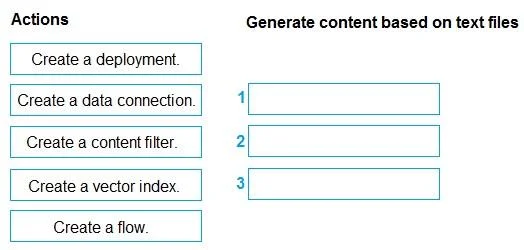
Answer Area
Drag items
Correct arrangement
- Create a deployment.
- Create a vector index.
- Create a flow.
Explanation
To build a Prompt Flow for Retrieval Augmented Generation (RAG) using Azure OpenAI and Azure AI Search with data from Blob Storage, the logical sequence is to first deploy the AI model, then create a searchable index from the data, and finally build the flow to orchestrate these components.
Approach. The correct interaction is to drag the following actions into the answer area in the specified order:
- Create a deployment. The scenario states an Azure OpenAI Service model is 'connected' to the project. For Prompt Flow to utilize this model for generating responses, it must be deployed as an endpoint that can be called. Creating a deployment makes the LLM available for inferencing.
- Create a vector index. The requirement is to 'generate responses based on the content of the text files' using an Azure AI Search resource. This implies a Retrieval Augmented Generation (RAG) pattern. To enable effective retrieval from the text files in Blob Storage, they must be processed, embedded, and indexed into a vector store using Azure AI Search. This step makes the textual content searchable.
- Create a flow. Once the Azure OpenAI model is deployed and the text files are indexed and made searchable via a vector index, the final step is to build the Prompt Flow. This flow will orchestrate the logic, typically involving retrieving relevant information from the vector index and then passing that information, along with the user query, to the deployed Azure OpenAI model for generating a response.
Common mistakes.
- common_mistake. 1. Selecting 'Create a data connection' as one of the three primary steps: While a data connection to Azure Blob Storage is necessary to access the text files, the creation of a vector index often implicitly involves specifying or creating the data source connection as part of the index creation process itself. Given the limited number of slots, 'Create a deployment' and 'Create a vector index' are more distinct top-level prerequisites for a RAG flow, with the data connection being a sub-step or an integrated part of the vector index creation.
- Selecting 'Create a content filter': Content filters are important for safety and moderation in AI applications but are not a primary step in establishing the fundamental RAG pipeline for retrieving content and generating responses from text files. They are typically configured separately or at the deployment level.
- Incorrect order of selected actions: The sequence is crucial. You cannot build a flow that utilizes an LLM deployment or a vector index if those components haven't been created first. Therefore, preparing the foundational AI model (deployment) and data retrieval mechanism (vector index) must precede the orchestration (flow creation).
Concept tested. The workflow for building a Retrieval Augmented Generation (RAG) application using Azure AI Studio's Prompt Flow, Azure OpenAI, Azure AI Search, and Azure Blob Storage. This includes understanding the sequential steps for deploying large language models, indexing external data for retrieval, and orchestrating these components within an AI workflow.
Topics
Community Discussion
No community discussion yet for this question.