
DP-100 · Question #562
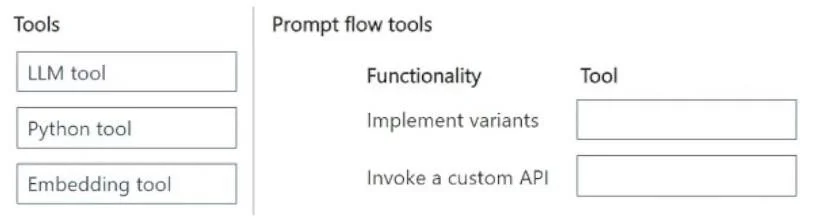
Drag and Drop Question You develop a Prompt flow in an Azure AI Foundry project. You plan to use variants and invoke a custom API in the flow. You need to add tools to the flow that will implement…
The correct answer is LLM tool; Python tool. To implement variants efficiently in Azure AI Prompt Flow, use the LLM tool, and to invoke a custom API, use the Python tool for custom code execution.
Question
Exhibit
Answer Area
Drag items
Correct arrangement
- LLM tool
- Python tool
Explanation
To implement variants efficiently in Azure AI Prompt Flow, use the LLM tool, and to invoke a custom API, use the Python tool for custom code execution.
Approach. To answer this question correctly, drag the 'LLM tool' from the 'Tools' pane and drop it into the slot next to 'Implement variants'. Then, drag the 'Python tool' from the 'Tools' pane and drop it into the slot next to 'Invoke a custom API'.
- Implement variants: In Azure AI Prompt Flow, variants are commonly used for experimentation, A/B testing, or refining prompts and model parameters, typically within Large Language Model (LLM) calls. The 'LLM tool' is specifically designed to interact with LLMs, and it natively supports the concept of variants to easily test different prompt engineering strategies or model configurations.
- Invoke a custom API: When you need to interact with external services, perform custom data processing, or integrate business logic not directly covered by specialized Prompt Flow tools, the 'Python tool' is the most suitable option. It allows you to write and execute arbitrary Python code, which can easily make HTTP requests to invoke a custom API, handle responses, and process data as needed. This provides maximum flexibility for custom integrations.
Common mistakes.
- common_mistake. A common mistake would be to use the 'Python tool' for 'Implement variants' or the 'LLM tool' for 'Invoke a custom API'. While theoretically you could write Python code to manage variant logic, the 'LLM tool' offers built-in, simpler, and more efficient support for variants directly within LLM calls, aligning with the goal to 'minimize development efforts'. The 'LLM tool' is designed for LLM interactions, not for making generic API calls, making it incorrect for 'Invoke a custom API'. The 'Embedding tool' is used for generating vector embeddings and is not relevant for either of the specified functionalities, so dragging it to either slot would be incorrect.
Concept tested. Understanding the purpose and appropriate usage of different tools within Azure AI Prompt Flow, specifically the LLM tool, Python tool, and Embedding tool, for common tasks like implementing experimentation variants and integrating with custom external APIs.
Topics
Community Discussion
No community discussion yet for this question.