
DP-100 · Question #462
Drag and Drop Question You manage an Azure Machine Learning workspace named workspace1 and a Data Science Virtual Machine (DSVM) named DSMV1. You must run an experiment on DSMV1 by using a Jupyter…
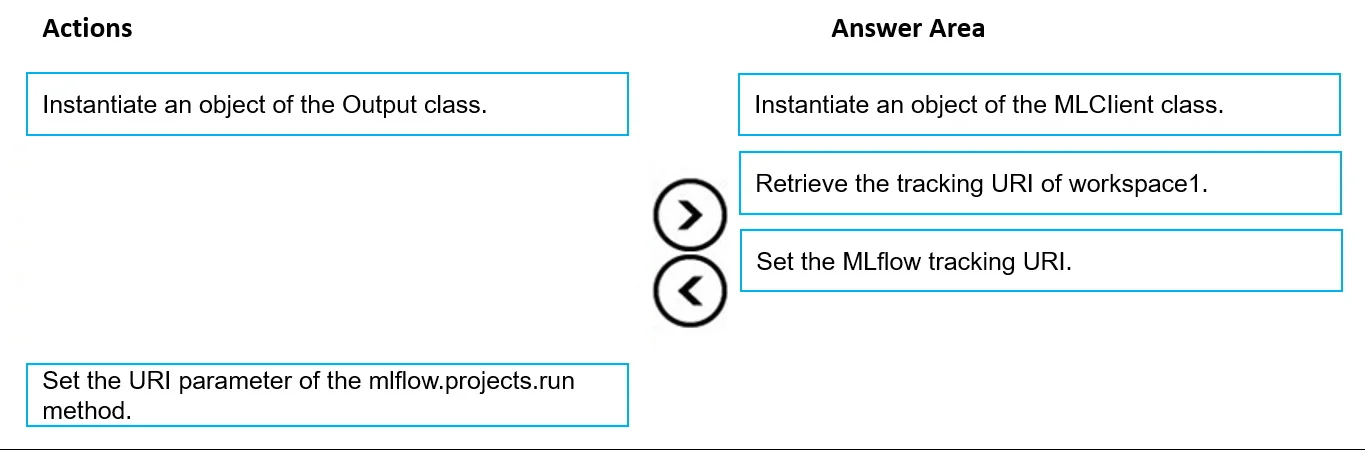
The correct answer is Instantiate an object of the MLClient class.; Retrieve the tracking URI of workspace1.; Set the MLflow tracking URI. To enable MLflow tracking for metrics and artifacts in an Azure Machine Learning workspace using Python SDK v2, you must first connect to the workspace, then retrieve its MLflow tracking URI, and finally configure MLflow to use that URI.
Question
Exhibit
Answer Area
Drag items
Correct arrangement
- Instantiate an object of the MLClient class.
- Retrieve the tracking URI of workspace1.
- Set the MLflow tracking URI.
Explanation
To enable MLflow tracking for metrics and artifacts in an Azure Machine Learning workspace using Python SDK v2, you must first connect to the workspace, then retrieve its MLflow tracking URI, and finally configure MLflow to use that URI.
Approach. The correct interaction is to drag the following three actions, in this exact sequence, to the 'Answer Area':
- Instantiate an object of the MLClient class.
- Retrieve the tracking URI of workspace1.
- Set the MLflow tracking URI.
This sequence is correct because:
- To interact with an Azure Machine Learning workspace programmatically using Python SDK v2, you first need to establish a connection by instantiating the
MLClientclass. ThisMLClientobject serves as the primary interface for managing Azure ML resources. - Once connected via the
MLClient, you can then retrieve specific properties of the workspace, including its unique MLflow tracking URI. This URI tells MLflow where to send experiment logs. - Finally,
mlflow.set_tracking_uri()is the standard MLflow function used to configure the MLflow client to direct all subsequent experiment tracking (metrics, parameters, artifacts) to the specified URI, which in this case is the Azure Machine Learning workspace's tracking endpoint.
Common mistakes.
- common_mistake. Common mistakes include selecting irrelevant actions or arranging the correct actions in an incorrect order.
- 'Instantiate an object of the Output class': The
Outputclass in Azure ML SDK v2 is used to define outputs for jobs and components within pipelines, not for setting up MLflow experiment tracking. It's unrelated to the task of configuring MLflow to log to a workspace. - 'Set the URI parameter of the mlflow.projects.run method': The
uriparameter inmlflow.projects.runtypically refers to the URI of the MLflow project source code (e.g., a Git repository or local path), not the MLflow tracking server URI. The tracking URI is set globally for the experiment usingmlflow.set_tracking_uri(), not as a parameter tomlflow.projects.runfor tracking purposes. - Incorrect order: Attempting to retrieve the tracking URI before instantiating the
MLClientobject would fail because the client object is required to query workspace details. Similarly, trying to set the MLflow tracking URI before retrieving it from the workspace would result in an invalid or non-existent URI being used.
Concept tested. This question tests the understanding of MLflow integration with Azure Machine Learning for experiment tracking, specifically how to configure MLflow to log metrics and artifacts to an Azure ML workspace using the Azure ML Python SDK v2.
Reference. null
Topics
Community Discussion
No community discussion yet for this question.