
DP-100 · Question #459
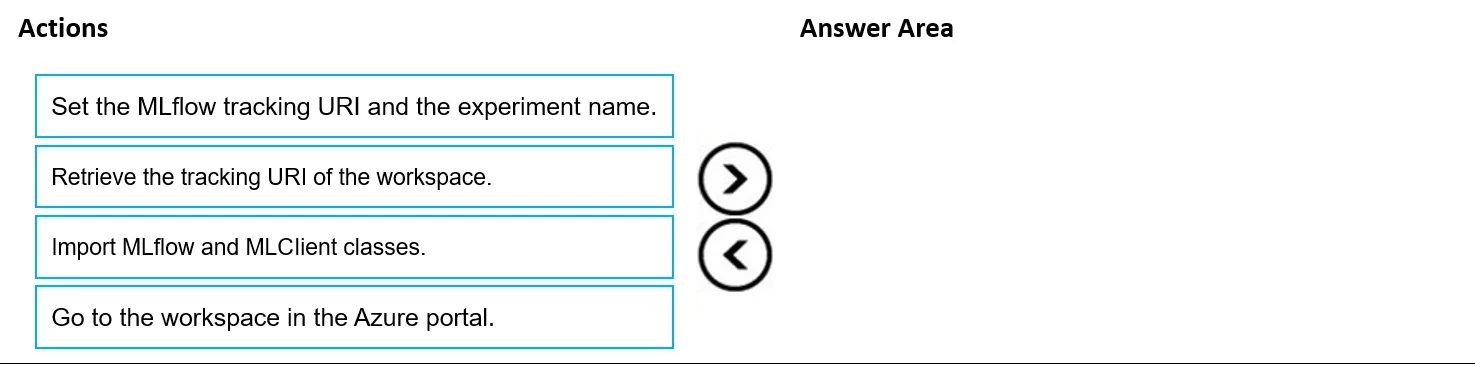
Drag and Drop Question You have an Azure Machine Learning workspace. You are running an experiment on your local computer. You need to ensure that you can use MLflow Tracking with Azure Machine…
The correct answer is Go to the workspace in the Azure portal.; Retrieve the tracking URI of the workspace.; Import MLflow and MLClient classes.; Set the MLflow tracking URI and the experiment name. This question tests the ability to correctly order the steps required to configure MLflow Tracking from a local machine to an Azure Machine Learning workspace using the Python SDK v2.
Question
Exhibit
Answer Area
Drag items
Correct arrangement
- Go to the workspace in the Azure portal.
- Retrieve the tracking URI of the workspace.
- Import MLflow and MLClient classes.
- Set the MLflow tracking URI and the experiment name.
Explanation
This question tests the ability to correctly order the steps required to configure MLflow Tracking from a local machine to an Azure Machine Learning workspace using the Python SDK v2.
Approach. The correct interaction is to drag the actions into the 'Answer Area' and arrange them in the following order:
- Go to the workspace in the Azure portal. - The first logical step when connecting a local environment to an Azure resource is to identify and access that resource to gather necessary information.
- Retrieve the tracking URI of the workspace. - Once in the Azure Machine Learning workspace, you need to find the specific MLflow tracking URI. This URI acts as the endpoint for your local MLflow client to send data.
- Import MLflow and MLClient classes. - Before you can set any MLflow configuration programmatically in your local script, you must import the required Python libraries, specifically the
mlflowmodule and theMLClientclass from Azure ML SDK v2. - Set the MLflow tracking URI and the experiment name. - Finally, with the URI retrieved and the necessary libraries imported, you can configure MLflow in your local script by calling
mlflow.set_tracking_uri()with the retrieved URI andmlflow.set_experiment()to define the experiment name.
Common mistakes.
- common_mistake. A common mistake would be to try and set the MLflow tracking URI before retrieving it from the Azure portal, or to import MLflow classes before knowing which URI to connect to. For example, if 'Retrieve the tracking URI' were placed after 'Set the MLflow tracking URI', it would be illogical as you need the URI first to set it. Similarly, setting the URI without importing the MLflow module first would lead to a runtime error. Another mistake could be trying to import classes or set the URI before identifying or accessing the workspace itself in the Azure portal, which is the source of the connection details.
Concept tested. This question tests the practical steps and understanding of how to configure and use MLflow Tracking with Azure Machine Learning Python SDK v2 for local experiment runs. It assesses knowledge of the workflow for connecting a local development environment to an Azure Machine Learning workspace for logging metrics and artifacts, including obtaining the workspace tracking URI and setting up the MLflow client.
Reference. null
Topics
Community Discussion
No community discussion yet for this question.